This method turns good history sources into a short, accurate video script. You put the sources in one notebook, ask for a script that follows a style guide, and then check every claim against the exact sentence it came from.
The main tool is Gemini Notebook, which Google called NotebookLM until July 2026. Claude, ChatGPT or Gemini can do a similar job if you paste your sources into the chat. The tools named below are examples, not recommendations, and none of them pays us.
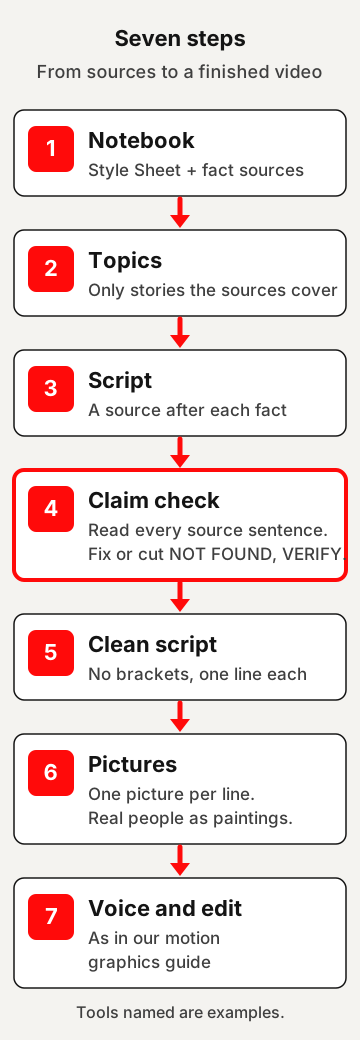
The seven steps at a glance
| Step | What you do | What comes out |
|---|---|---|
| 1. Notebook | Add the Style Sheet and your fact sources, then paste the setup prompt | A notebook that knows your rules |
| 2. Topics | Ask for ideas the sources actually cover | A short list to pick from |
| 3. Script | Ask for a script with a source after each fact | A first draft |
| 4. Claim check | Ask for the exact source sentence behind each fact, then read them | A script you can stand behind |
| 5. Clean script | Remove the source brackets | Lines ready for a voice |
| 6. Pictures | Ask for one picture description per line | A numbered picture plan |
| 7. Voice and edit | Record or generate the voice, make the pictures, edit | A finished video |
The tools
- Gemini Notebook (notebook.google): Google calls it “an AI-powered research assistant designed to help you refine and organize your ideas.” It was called NotebookLM until Google renamed it in July 2026. Its help pages say you can sign up free of charge with a Gmail account.
- Claude (claude.ai): Anthropic’s AI assistant. Its pricing page lists a free plan.
- ChatGPT (chatgpt.com): a chatbot whose home page offers to sign up for free. Its home page says you can upload files once you log in.
- Gemini (gemini.google): Google’s AI assistant.
With Claude, ChatGPT or Gemini, paste your sources into one chat and use the same prompts, with “this chat” where they say “this notebook”. Our reading: a notebook tool suits this method well, because its answers cite the sources you added.
1. Build the notebook
In Gemini Notebook, a notebook is a collection of sources for a specific project. You can add web URLs, PDF files, copy and pasted text and YouTube URLs of public videos, among other types.
A few limits are worth knowing before you start:
- From a web page, only the text is used. Paywalled webpages aren’t supported.
- From a YouTube video, only the text transcript of the video is imported. Only public videos with captions work.
- Google’s tip: avoid uploading documents you don’t have rights to.
Two kinds of sources
Your notebook holds two kinds of sources, and each has one job.
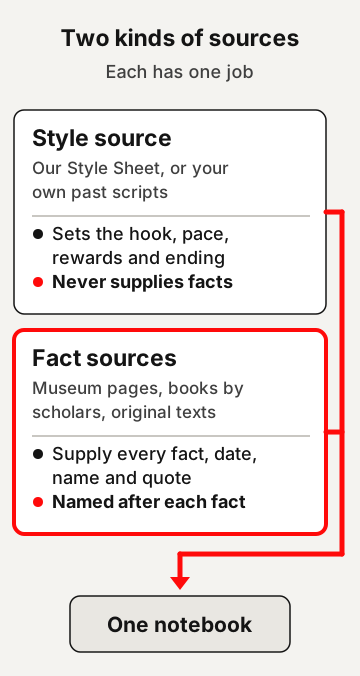
- The style source is the Style Sheet below, pasted in as text. It sets how the script sounds and flows. It never supplies facts.
- The fact sources are where every fact comes from. Choose good ones: museum pages, books and articles by scholars, and original texts. When two good sources disagree, the script should say so rather than pick one quietly.
Our guides to checking a source before you share it and reading a study help you choose. A popular video about history can be a useful lead, but treat it as a pointer to better sources, not as a fact source.
Why a new channel needs its own Style Sheet
If you have past scripts, you can add them as a style source. A new channel has none. So write a short style guide once, add it as a source, and every script follows it.
You can learn pace from channels you like: how fast they move, and where they turn the story. Never copy their words or their format. YouTube’s monetization policies say: “If you borrow content from someone else, you need to change it significantly to make it your own.”
What the Style Sheet is built on
YouTube Studio has a report on key moments for audience retention. Three of its points shaped our Style Sheet:
- The first 30 seconds. The report’s intro figure is the share of viewers who still watched after the first 30 seconds. YouTube says a high figure could mean the content matched the viewer’s expectation of the video’s thumbnail and title. So the hook only promises what the script delivers.
- People drift away. YouTube says videos generally taper off during the playback period. So the Style Sheet asks for a new reward every 20 to 30 seconds.
- Dips. A dip means viewers are abandoning or skipping at that part of your video. So the Style Sheet cuts anything that does not move the story forward.
YouTube only highlights these moments on videos at least 60 seconds long with at least 100 views.
The timings in the Style Sheet are our rules of thumb, not YouTube’s. “About 150 spoken words a minute” is a rough guide too. Time your own voice and adjust.
The tone follows our house style: real details, no fake drama, and every hook paid off. YouTube’s policies also describe “unsatisfying or off-putting content” that “appears designed to shock or surprise viewers for the sole purpose of getting views”. A calm voice is the safer habit.
Add this to the notebook as a pasted-text source and title it “Style Sheet”. Each notebook is independent, so add the Style Sheet to every new notebook.
Use as is
STYLE SHEET — how every script should sound and flow

1. THE HOOK (first 10 seconds)
- Start inside the story. No greeting, no channel name, no "in this video".
- Line 1: the popular version, said the way people usually tell it.
- Line 2: one real detail from the sources that does not fit.
- Line 3: the promise: what the viewer will know by the end.
- Only promise what the script delivers.

2. KEEP THEM WATCHING
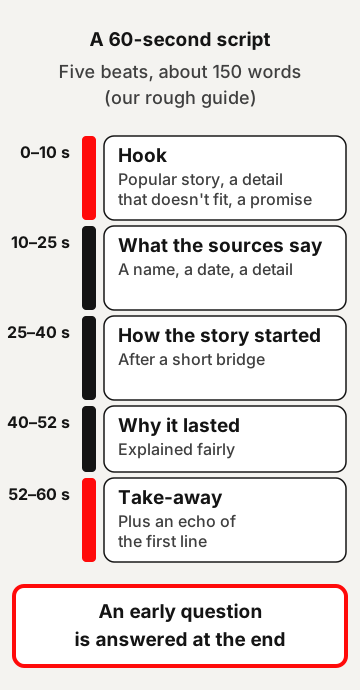
- Ask one question early. Answer it near the end, not sooner.
- Every 20 to 30 seconds, give a new reward: a surprising detail, a name, a date, a line from the record, or a turn in the story.
- Before each new part, add a short bridge: "But that is not where the story started."
- Show, don't summarise: a person, a place or an object the viewer can picture.
- One idea per sentence. Mostly short sentences, with a longer one now and then.
- Cut anything that does not move the story forward.

3. MAKE IT REWARDING
- The ending fully answers the question from the start.
- Explain fairly why the popular story lasted. Never mock the people who believed it.
- Give one thing the viewer can take away and use.
- The last line echoes the first line.

4. VOICE
- Calm, curious and confident: someone sharing what they found.
- Plain words. Explain any hard word in the same sentence.
- Real details are dramatic enough. Never exaggerate.
- Never say "the truth is", "they lied to you" or "nobody knows this".

5. TIMING (about 150 spoken words a minute)
60-second script, about 150 words:
- 0–10 s: hook
- 10–25 s: what the sources say
- 25–40 s: how the story started
- 40–52 s: why it lasted
- 52–60 s: take-away + echo of line 1

8-minute script, about 1,200 words:
- 0:00–0:30: hook and the question
- three parts, each ending on a small question or turn
- the answer
- why it lasted
- take-away + echo of line 1
Paste the setup prompt
Paste this as your first chat message. It tells the notebook which source sets the style and which ones supply the facts.
Template — fill in the brackets
Act as a careful history researcher and script writer for my [type of channel, e.g. calm history explainers].

This notebook has two kinds of sources:
- Style source: the "Style Sheet" in this notebook [and any of my own past scripts]. Follow it for the hook, pace, rewards and ending. Never take facts from it.
- Fact sources: [names of the articles, books and museum pages]. Every fact in a script must come from these.

Rules:
- Never invent facts, dates, names, numbers or quotes.
- After each fact, put the source name in brackets.
- If a fact is not in the fact sources, or the sources disagree, mark it VERIFY and say why.
- Tone: [calm, curious, clear]. Share what the sources say. Never mock anyone, including people who believe the popular story.
- Stop after each step and wait for my next message.
Ready to use — copy and paste as is
Act as a careful history researcher and script writer for a calm history explainer channel.

This notebook has two kinds of sources:
- Style source: the "Style Sheet" in this notebook. Follow it for the hook, pace, rewards and ending. Never take facts from it.
- Fact sources: every other article, book and museum page I added. Every fact in a script must come from these.

Rules:
- Never invent facts, dates, names, numbers or quotes.
- After each fact, put the source name in brackets.
- If a fact is not in the fact sources, or the sources disagree, mark it VERIFY and say why.
- Tone: calm, curious and clear. Share what the sources say. Never mock anyone, including people who believe the popular story.
- Stop after each step and wait for my next message.Two kinds of sources, each with one job.
2. Ask for topic ideas
Ask only for stories your fact sources actually cover. A topic with thin sources makes a thin script.
Template — fill in the brackets
Suggest [5] topic ideas about [era or subject] where the popular version of a story differs from what the fact sources say. For each idea, give one line for the popular version, one line for what the sources say, and the source name. Only suggest stories the fact sources actually cover.Ready to use — copy and paste as is
Suggest 5 topic ideas where the popular version of a story differs from what the fact sources say. For each idea, give one line for the popular version, one line for what the sources say, and the source name. Only suggest stories the fact sources actually cover.3. Write the script
Pick one idea and ask for the script. The source name in brackets after each fact is what makes step 4 possible.
Template — fill in the brackets
Write a [length, e.g. 60-second / 8-minute] voiceover script on idea [number]. Spoken words only: no headings, no scene notes. Follow this order:
1. The popular story, told plainly.
2. What the sources say.
3. How the popular story started.
4. Why it still lasts.
5. One thing the viewer can take from it.
Follow the Style Sheet: hook in the first three lines, a new reward every 20 to 30 seconds, and an ending that answers the opening question.
Keep sentences short. Put the source name in brackets after each fact, and VERIFY where needed.
Ready to use — copy and paste as is
Write a 60-second voiceover script on the idea I picked. Spoken words only: no headings, no scene notes. Follow this order:
1. The popular story, told plainly.
2. What the sources say.
3. How the popular story started.
4. Why it still lasts.
5. One thing the viewer can take from it.
Follow the Style Sheet: hook in the first three lines, a new reward every 20 to 30 seconds, and an ending that answers the opening question.
Keep sentences short. Put the source name in brackets after each fact, and VERIFY where needed.4. Check every claim
This step is the heart of the method. In Gemini Notebook, answers use direct quotes, text, and images from your sources as citations. Google says these citations help you check response accuracy, and that selecting one takes you to the quote in context.
A citation shows you where to look. It does not prove the script says what the source says. Google’s own help page says Gemini Notebook can make mistakes. So you read each source sentence yourself.
Use as is
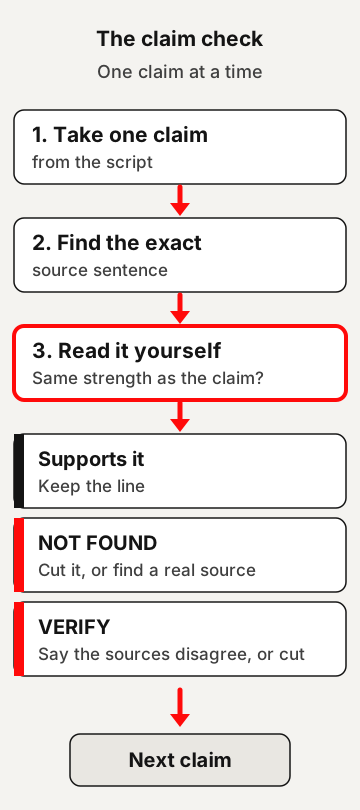
List every fact in the script as a table with three columns: the claim, the source name, and the exact sentence from that source that supports it. Copy the source sentence word for word. If no sentence supports the claim, write NOT FOUND.Then go down the table, one row at a time:
- Read the source sentence. Does it say the same thing as the claim, with the same “about”, “may” or “some”? If the claim is stronger than the sentence, soften the claim.
- NOT FOUND: cut the line, or find a real source and add it to the notebook.
- VERIFY: read the sources that disagree. Say in the script that they disagree, or cut the line.
- Quotes: check them twice. Our guide to spotting a fake quote shows how.
Our guide to why AI makes things up explains why this step matters even when every line has a source name.
One row at a time.
5. Get the clean script
Once every claim checks out, ask for the script without the brackets. One sentence per line makes the voice easy to record and the pictures easy to match.
Use as is
Remove the source brackets and give me the clean script, one sentence per line, ready for a voice tool. Change no words.6. Plan the pictures
Ask for one picture description per line, numbered S-01, S-02 and so on. Line 4 always goes with picture 4.
Draw real historical people as painting-style illustrations, never as realistic photos. YouTube requires creators to disclose AI-generated or altered content that seems realistic, including content that makes a real person appear to say or do something they didn’t do. It also says creators don’t need to disclose non-realistic content that’s made with AI. Our reading: a painted look keeps a history video clearly on the side of illustration. Check each video against the rules anyway.
Template — fill in the brackets
For each line of the clean script, write one picture description. Number them S-01, S-02 and so on. Each picture has one main object, a [look, e.g. dark oil-painting] style, a [16:9 / 9:16] shape, and no words or logos. If a real historical person appears, show them as a painting-style illustration, never as a realistic photo.Ready to use — copy and paste as is
For each line of the clean script, write one picture description. Number them S-01, S-02 and so on. Each picture has one main object, a dark oil-painting style, a 16:9 shape, and no words or logos. If a real historical person appears, show them as a painting-style illustration, never as a realistic photo.7. Add the voice and edit
From here the work is the same as in our motion graphics guide:
- Pictures and clips: paste the picture plan into an image tool, then animate the pictures if you want motion. See its steps 2 and 3.
- Voice: record yourself, or paste the clean script into a text-to-speech tool. See its step 4.
- Music and edit: use only tracks you are allowed to use, then build the edit from the voice up. See its steps 5 and 6.
A worked example: the flat-Earth story
Here is the method on one story from our library: the idea that medieval people thought the Earth was flat. Every fact below comes from that page’s sources.
The popular version: people in the Middle Ages thought the Earth was flat, and Columbus sailed west to prove them wrong.
Fact sources in the notebook:
- a British Library blog post quoting Bede
- Washington Irving’s 1828 life of Columbus
- Robert Burton’s The Anatomy of Melancholy
- the historian Jeffrey Burton Russell’s “The Myth of the Flat Earth”
Our sample 60-second script
This is our example, written by us to follow the Style Sheet, shown as the clean script without the source brackets. It is 155 words, close to our rough guide of about 150.
Medieval people thought the Earth was flat, and Columbus sailed to prove them wrong.
But around 723 or 725, a monk called Bede wrote that the Earth is a sphere.
So where did the flat-Earth story come from? By the end, you’ll know.
A few early Christian writers did reject a round Earth. One historian counts at least two, and at most five.
The flat-Earth story mostly grew much later.
In 1828, Washington Irving’s life of Columbus dramatised a hearing where texts of scripture were set against a round Earth.
By the 1860s, one historian says, it was being served up in schools as the solemn truth, as part of a bigger story of science at war with religion.
And Columbus? Even in Irving’s scene, men of science accepted a round Earth.
So when an old story makes people look foolish, read what they wrote themselves.
The flat-Earth Middle Ages is largely a 19th-century story.
Our sample claim check
Here is part of the table step 4 would give for that script. The last two rows show the two flags. We added the last row on purpose, to show what NOT FOUND looks like: that claim is not in our script, and none of our sources says it.
| Claim | Source | Exact source sentence | Result |
|---|---|---|---|
| Bede wrote that the Earth is a sphere | British Library blog, quoting Bede | “It is, in fact, a sphere set in the middle of the whole universe.” | Found |
| Irving’s men of science accepted a round Earth | Irving, life of Columbus (1828) | “Others, more versed in science, admitted the globular form of the earth” | Found |
| The flat-Earth story grew in the 19th century | Russell | “No one before the 1830s believed that medieval people thought that the earth was flat.” | VERIFY: a 17th-century book already said a few Church Fathers held a flat Earth, so the script says “mostly” |
| Columbus’s sailors feared falling off the edge | none | NOT FOUND | Cut |
The VERIFY row is the kind worth slowing down for. Robert Burton’s The Anatomy of Melancholy, in the 17th century, already said Augustine, Basil and Lactantius held the Earth “round as a trencher”, a flat plate. So one word, “mostly”, keeps the script honest.
What can go wrong
- A source name is there, but the fact is not. Read the exact sentence in step 4. A bracket is a pointer, not proof.
- The script borrows facts from the Style Sheet. The setup prompt says never to. If it happens, cut the fact or find it in a fact source.
- A source will not load. Paywalled webpages aren’t supported, and YouTube videos need captions. Paste the text yourself if you have the right to use it.
- The sources disagree. That is not a problem to hide. Say so in the script, in one short line.
- The hook promises too much. Check that the ending answers the opening question, and nothing bigger.
- The notebook won’t write the script. Google’s help says that for more creative tasks you may get “Gemini Notebook can’t answer this question”, and suggests rephrasing. Ask again more plainly, step by step.
Before you post
YouTube’s monetization policies list “content that exclusively features readings of other materials you did not originally create, like text from websites or news feeds”. Our reading: a script built from your own research, in your own words, is a different thing from reading a source aloud. The same page says channels where content feels interchangeable from video to video are not allowed to monetize, and lists “AI-generated content made with generic or unoriginal templates giving the impression of mass production without adding the creator’s original, authentic insights or perspective”. The Style Sheet sets a shape, not the substance: give each video its own story, sources and take-away. Our guide to AI side hustles covers faceless channels in more detail.
For labels on AI pictures and music licences, see before you post in the motion graphics guide. Before you use a tool’s voices, pictures or music in videos that earn money, check that tool’s own terms.
Try it this week
| When | What to do |
|---|---|
| Day 1 | Pick one story. Find three good fact sources and add them with the Style Sheet. |
| Day 2 | Run steps 1 to 3 and get a 60-second script. |
| Day 3 | Run the claim check. Read every source sentence, and cut what you can’t confirm. |
| Day 4 | Get the clean script and the picture plan. Record the voice. |
One short script, checked line by line, teaches you more about the method than five written fast. That last line is our view, not a finding.
Quick answers
Is NotebookLM the same as Gemini Notebook?
Yes. Google renamed NotebookLM to Gemini Notebook in July 2026 and calls it the same product.
Can I do this with Claude or ChatGPT instead?
Mostly. Paste your sources into one chat and use the same prompts, with "this chat" where they say "this notebook". Gemini Notebook's answers cite the sources you added, which in our reading makes the claim check quicker.
Does a citation mean the fact is right?
No. A citation shows where to look. Google says Gemini Notebook can make mistakes, so read each source sentence yourself.
Can I add YouTube videos as sources?
Yes, public videos with captions. Only the text transcript of the video is imported.
Use this
A script is only as good as the source sentence behind each line.
- Add three good fact sources and the Style Sheet to one notebook.
- Ask for a short script with a source name after each fact.
- Read every source sentence, and cut what you can't confirm.
Can I point to the exact source sentence for every fact in this script?
Quick quiz
Nothing is scored or saved. Recalling it once now is what makes it last.
1. What is the Style Sheet in the notebook for?
Answer: Setting the hook, pace, rewards and ending.Read it again ↑
2. What do you do with a claim marked NOT FOUND?
Answer: Cut it, or find a real source and add it.Read it again ↑
3. How does the method say to show real historical people in pictures?
Answer: As painting-style illustrations.Read it again ↑
How we checked this · Last checked October 2026
- Gemini Notebook's features come from its own help pages and Google's announcement of the rename, read in October 2026.
- Claims about viewers come only from YouTube's own help pages. The Style Sheet's timings and the words-a-minute figure are our rules of thumb.
- Every fact in the worked example comes from the sources of our flat-Earth article, re-opened for this page.
- Each tool is described from its own page. We copied no prices, plans or limits, and we rank no tools.
- The prompts and the Style Sheet are our own, written for this page.
Sources
How the tools work
- Gemini Notebook Help: “Learn about Gemini Notebook”, “Add or discover new sources for your notebook”, “Use chat in Gemini Notebook”, “Create a notebook in Gemini Notebook” and “Learn about Gemini Notebook’s plans”.Primary
- Google, “NotebookLM is now Gemini Notebook”, 16 July 2026.Primary
YouTube’s own pages
- YouTube Help: “Measure key moments for audience retention”, “YouTube channel monetization policies” and “Disclosing use of GenAI content”.Primary
The worked example
- Alison Hudson, “‘The Earth is, in fact, round’”, British Library Medieval Manuscripts blog (24 May 2018), quoting Bede, The Reckoning of Time, trans. Faith Wallis.Popular
- Washington Irving, A History of the Life and Voyages of Christopher Columbus, vol. I (John Murray, 1828).Primary
- Robert Burton, The Anatomy of Melancholy.Primary
- Jeffrey Burton Russell, “The Myth of the Flat Earth”, American Scientific Affiliation (1997).Scholarly
Tools, described from their own pages
- Gemini Notebook, Claude pricing, ChatGPT and Gemini.Primary
The claim check is the whole point
Any tool can write a script that sounds sure of itself. What makes yours worth watching is that every line holds up when someone checks it. We'd put most of the time into step 4, not into the script.
Pick fact sources you would trust
- Start with three. A museum page, a scholar's book or article, and an original text if you can find one.
- Check each one first. Ask who wrote it and what they base it on, before you add it.
- Keep popular videos as leads. Use them to find better sources, not as sources.
- Note disagreements. When two good sources differ, write it down. It often makes a strong line in the script.
This week: one checked 60-second script
Pick a story you already find interesting. Add three good sources and the Style Sheet. Write one 60-second script, run the claim check, and cut anything you can't confirm. Note which step took longest.
Read next on this site
- Spot a fake quoteA quick way to test any quote in your script.
- Why AI makes things upWhy a source name is a pointer, not proof.
- Read a studyNine questions for any source that cites research.
- The flat-Earth storyThe full article behind the worked example.
Ways to use the skill for others
- Offer research and checked scripts to history creators who already make their own videos.
- Turn a teacher's or a museum volunteer's notes into a short script, with their sign-off on every fact.
- Sell the claim check on its own, reading someone's script against their sources.
- Before any paid job, read each tool's terms on using its output in videos that earn money.
Ideas to explore, not financial or business advice. No result is promised.