

AI notetakers can turn a meeting, a lecture or an interview into a transcript and a summary. Two things matter before you press record. Has everyone in the conversation agreed, and what do the tool’s own terms let it do with the recording? Below: three tools, the consent rules in a few places, and how to check the notes. Prices and plans are as we read them in October 2026.
1. Three tools at a glance
One tool joins your call, one works on recordings you already have, and one is built into the call.
| Tool | How it hears the meeting | Free option | What its own policy says about training |
|---|---|---|---|
| Otter.ai | A notetaker joins the call, or you record on your device | Basic: 300 minutes a month, up to 30 minutes a conversation | Training on de-identified audio recordings and on transcriptions, which may contain personal information |
| Descript | You upload or record audio or video | Free: 1 media hour a month | Data may be used for research and development, including training AI models |
| Google Meet “Take notes for me” | Built into the meeting | None: needs an eligible Google Workspace edition or Google AI plan | Workspace data is not used to train models outside Workspace without permission |
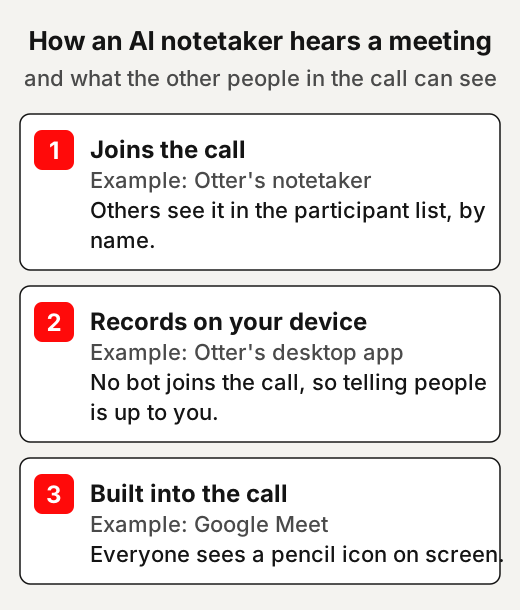
The drawing shows one difference that matters for consent: whether the other people in the call can see that notes are being taken.
2. Before you press record: consent
Recording rules differ by place: some let one person in the conversation record, others need everyone’s agreement.
What follows describes a few rules and quotes them where it can. It is not legal advice, and the rules where you and the other people live may differ. Check the law where you are, or ask a lawyer when the recording matters.
United States
The federal wiretap law lets a party record a call; California asks all parties to agree for confidential ones.
The US federal wiretap law says it is not unlawful for a private person to intercept a conversation they take part in. The same applies when one party has given prior consent. That does not cover a recording made to commit a criminal or tortious act, meaning a civil wrong.
California’s Penal Code makes it an offence to record a confidential conversation “without the consent of all parties”. It defines a confidential conversation as one where any party may reasonably want it kept among the people taking part. It excludes a public gathering, and any situation where the people talking “may reasonably expect that the communication may be overheard or recorded”.
So a call between people in different places can fall under different rules. Otter’s own help page suggests that teams working across several places apply all-party practices everywhere. That is a company’s suggestion, not a ruling on any law.
United Kingdom
The UK’s data protection office says organisations that use AI meeting tools should tell people and check the output.
The Information Commissioner’s Office (ICO) upholds information rights in the UK, including data privacy for individuals. It has published answers to questions that organisations sent its innovation advice service. It says this guidance is under review after changes made by the Data (Use and Access) Act. For AI meeting tools, it says privacy notices should be updated to tell people how and why the tool is used. It adds that organisations must check that AI outputs are accurate.
On AI call transcripts, the ICO says that where an organisation relies on consent, it must be “freely given, specific, informed”. It also notes that consent is not the only lawful basis an organisation may use.
What the tools themselves say
Otter’s and Google’s pages ask the person who records to tell people, and Otter’s terms make consent the user’s job.
Otter’s terms say the laws on notice for recorded conversations vary by location. They make the user “solely responsible” for giving notice and getting consent where the law requires it. Google’s help page for Meet’s note-taking feature asks you to let everyone know once you turn it on.
For example, you might start a call by saying an AI notetaker is running, and asking whether anyone minds. If someone does, switch it off and take notes by hand.
3. Otter.ai: a notetaker that joins your calls
Otter can send a notetaker into Zoom, Google Meet and Microsoft Teams calls, or record from your own device.
Otter’s help centre says its Notetaker automatically joins Zoom, Google Meet and Microsoft Teams meetings to record and transcribe them in real time. By default it joins under a name made from your first name and “Notetaker (Otter.ai)”; in some workspaces it may show the workspace name instead. Otter also has a desktop app that records from your Mac or Windows computer with no bot joining the call.
How to use it
A few settings decide when the notetaker joins, who is told, and who sees the notes.
These settings come from Otter’s own help pages:
- Choose which calls it joins. In the auto-join settings, pick “Meetings I manually select”, so the notetaker only joins the calls you choose.
- Warn guests before the meeting. With pre-recording emails turned on, Otter emails every guest on the calendar invite that the notetaker is scheduled to join.
- Keep the notes private by default. Set the default sharing to “Don’t Share-keep my notes private” and share each conversation yourself.
- Tell people how to stop it. Anyone in the call, with or without an Otter account, can remove the notetaker by typing “stop otter” in the meeting chat.
For example, for a weekly team call you might leave auto-join off and send the notetaker only on weeks when everyone has said yes.
Free plan and prices
The free plan suits short meetings; longer ones need a paid plan.
Otter’s Basic plan is free, with 300 transcription minutes a month and up to 30 minutes per conversation. It keeps your 25 most recent conversations and lets you import 3 audio or video files in total. Prices are in US dollars: Pro is listed at $8.33 per user a month on the yearly plan, or $16.99 paid monthly. Business is $19.99 per user a month yearly, or $30 monthly.
Trust box: Otter.ai
Read Otter’s training clause before you record other people.
- Run by: Otter.ai, Inc., which publishes its terms (effective 19 September 2025) and privacy policy (effective 16 June 2026).
- Training: its privacy policy lists “training our proprietary AI technology on de-identified audio recordings and on transcriptions (which may contain Personal Information)”.
- Its terms on “Aggregated Data” (section 18.4): Otter may use “aggregated and/or deidentified data derived from Data or use of the Services” “for its business purposes, including for machine learning and training, industry analysis, benchmarking, and analytics”. The terms say that data “will not identify you”, and they define “Data” to include “recordings” you enter into or upload to the service (section 18.1).
- Worth knowing: a proposed class action filed in a US federal court in August 2025 alleges that Otter recorded private conversations without the consent of all participants. In August 2026 the court dismissed some claims and let others go ahead, and Otter answered the amended complaint in September 2026. When we checked the court record in October 2026, the case was still open, with no final decision.
4. Descript: transcripts of recordings you already have
Descript turns an audio or video file into a transcript you can edit like a document.
Descript’s terms describe an app that transcribes audio and lets you edit audio and video by editing the text of the transcript. It suits a talk, a lecture or an interview you have recorded, rather than a live call.
How to use it
Upload the file, check who said what, then tidy and read the transcript.
- Add the recording. Upload the audio or video file, or record straight into Descript.
- Check the speakers. Descript says it labels the speakers in a recording and plays a clip of each one so you can name them.
- Tidy the text. Descript says its AI detects filler words such as um and uh, so you can clean them up.
- Read it through. Check the transcript against the recording before you use it.
For example, after a recorded interview you could name the two speakers, cut the filler words, and keep the transcript beside your notes.
Free plan and prices
The free plan covers one hour of media a month.
Descript’s free plan includes 1 media hour a month and exports video at 720p with a watermark. It transcribes recordings in 25 languages. The Hobbyist plan is listed at $16 a person a month billed yearly, or $24 monthly, with 10 media hours a month. The pricing page shows the dollar sign but does not name the currency.
Trust box: Descript
Descript’s terms and privacy policy name AI training among their purposes, and both mention a way to opt out.
- Run by: Descript, Inc. (terms last updated 25 February 2025; privacy policy last updated 14 April 2025).
- Training: the privacy policy lists research and development “including training our artificial intelligence models”.
- Its terms on AI features: Descript may use the input and output of its AI features “to train, improve, and develop its models and technologies (unless you have opted out of such use)” (section 8.4(e)).
- Opt-out: the privacy policy says “You can opt out of having your Projects used to improve the Descript Service by disabling the Share Data with Descript setting”. Separately, the Enterprise plan lists “AI and data controls: opt-out of training, custom retention”.
- Ownership: its terms say that, as between you and Descript, you own your input and output “to the extent protectable under applicable law”.
5. Google Meet’s “Take notes for me”: built into the call
If your Google account includes it, Meet itself writes the notes into a Google Doc.
Google says the feature requires an eligible Google Workspace edition or Google AI plan. It captures meeting notes in Google Docs. The organiser gets an email with a link to the recap shortly after the meeting ends. Google recommends it for meetings of 15 minutes to a maximum of 8 hours.
How to use it
Turn it on from the calendar or the call, and tell people when you do.
- Check the language. It works in English, French, German, Italian, Japanese, Korean, Portuguese and Spanish, one language at a time.
- Turn it on. Start it from Google Calendar, from the screen before you join, or inside the call. Google says it can also be used for in-person meetings. On work or school accounts, Google says it “may be automatically on for certain meetings” depending on admin settings.
- Tell people. Meet shows a pencil icon on every participant’s screen, and Google’s help page asks you to let everyone know.
Google says that several languages spoken in the same meeting aren’t currently supported. For example, if a meeting mixes English and Spanish, choose the main language before you start.
Trust box: Google Meet
Google’s Meet privacy page says Workspace data is not used to train its AI models outside Workspace without permission.
- Run by: Google, as part of Google Workspace and Google AI plans. The help page names no price.
- Training, Workspace accounts: Google’s Meet privacy page says it does not use Workspace data to train the models behind Gemini, Search and other systems outside Workspace without permission. The same page adds that if a Workspace user with a personal account chooses to share data, including Workspace data, with Gemini Apps or Search services “for Personal Intelligence, or through screen actions (including screenshots)”, that data “may be used for model training and improvement”.
- Training, Google AI plans: Google says Gemini in Meet “doesn’t use your content to train or improve Gemini or other generative AI models”.
- Consent screen: an administrator can require every participant to give explicit consent before notes start; Google says this setting is off by default.
6. What happens to your recordings
The three tools describe training in different words, so read each clause before you upload someone’s voice.
Otter’s clauses mention de-identification. That means removing the link between data and the person it came from. The US National Institute of Standards and Technology (NIST) has a formal definition. NIST calls de-identification “any process of removing the association between a set of identifying data and the data subject”.
A clause about training does not say how well the data is de-identified, and the Otter pages we read do not explain the method. Our reading: if a recording holds something you would not want outside the room, the safest choice is not to record it.
For example, before recording a client call, open the tool’s privacy policy and search the page for “train”.
7. Check the notes before you rely on them
AI notes can be wrong, so read them against what was said before you share them or act on them.
Google’s help page says a meeting summary “can be incomplete, inaccurate, or not generated”. Otter’s terms say AI outputs may be inaccurate or incomplete, and that users should not rely on them without confirming them. Descript’s terms say its AI may produce output that is inaccurate or unreliable.
Names, numbers and who agreed to do what are the parts to read most closely. For example, if the notes say someone will send a report by the 15th, check the recording before you put it in a follow-up email. Our page on why AI makes things up explains why these errors happen.
8. Which one fits which job
Pick by where the conversation happens and who needs to agree.
| Job | Tools that fit, from the pages we read |
|---|---|
| A live video call where you want notes | Otter’s notetaker, or Meet’s note-taking if your plan includes it |
| A recorded lecture or interview | Descript, or Otter’s file import |
| An in-person meeting | Otter’s phone app, or Meet’s note-taking, which Google says works in person |
This is our reading, not a ranking. We have no paid link with any of these tools and did not sign up for any of them. Everything above comes from their own public pages.
Quick answers
Is it legal to use an AI notetaker in a meeting?
It depends on where you and the other people are. The US federal wiretap law does not forbid recording a conversation you take part in, while California asks every party to agree to recording a confidential one. Check the law where you are.
Does Otter use my recordings to train its AI?
Otter's privacy policy lists "training our proprietary AI technology on de-identified audio recordings and on transcriptions (which may contain Personal Information)". Its terms also let it use aggregated or de-identified data "for machine learning and training", and say that data "will not identify you".
Is Otter free?
Otter's Basic plan is free, with 300 transcription minutes a month and up to 30 minutes per conversation, as we read it in October 2026.
Can other people in the call stop an AI notetaker?
With Otter, yes. Anyone in the call, with or without an Otter account, can remove the notetaker by typing "stop otter" in the meeting chat.
Are AI meeting notes accurate?
Not always. Google says a meeting summary can be incomplete or inaccurate, and Otter's and Descript's terms warn that AI output may be inaccurate.
Use this
Our checklist, built from the tools' own help pages and the rules described above.
Does everyone in this conversation know it is being recorded, and have they agreed?
Quick quiz
Nothing is scored or saved. Recalling it once now is what makes it last.
1. What does California's Penal Code ask for before someone records a confidential conversation?
Answer: The consent of all parties.Read it again ↑
2. How can anyone in a call remove Otter's notetaker, according to Otter's help centre?
Answer: By typing "stop otter" in the meeting chat.Read it again ↑
3. What does Google's Meet privacy page say about Workspace data and AI training?
Answer: It is not used to train models outside Workspace without permission.Read it again ↑
How we checked this · Last checked October 2026
- We read each tool's own home, pricing, terms and privacy pages, and Otter's and Google's help pages, on 27 October 2026. We did not sign up for any tool or start a trial.
- Prices change often and some pages show promotions; we give the standard listed prices and say when a page does not name its currency.
- For the consent rules we read the US Code on govinfo, California's Penal Code on the state legislature's site and the UK ICO's published answers, which the ICO says are under review.
- We list only tools whose own pages we could read in full and whose claims we could check. Other tools of the same kind were looked at and are not on this page.
- The Otter court case is described from the court docket, the court's order of 13 August 2026 and one news report; we do not judge it.
Sources
The tools’ own pages
- Otter.ai, home page and pricing (otter.ai, read 27 October 2026)Primary
- Otter.ai, Terms of Service (effective 19 September 2025) and Privacy Policy (effective 16 June 2026)Primary
- Otter.ai Help Center: Otter Notetaker Overview, Recording Permissions with Otter, Remove Otter Notetaker from your meeting, Turn off auto-share for conversations & meetingsPrimary
- Descript, pricing and transcription pages (descript.com, read 27 October 2026)Primary
- Descript, Terms of Service (last updated 25 February 2025) and Privacy Policy (last updated 14 April 2025)Primary
- Google Meet Help, ‘Take notes for me’ in Google Meet and Learn how Gemini in Gmail, Calendar, Chat, Docs, Drive, Sheets, Slides, Meet, Vids & Pics protects your dataPrimary
Laws and regulators
- 18 U.S.C. §2511(2)(d), United States Code (govinfo, 2024 edition)Primary
- California Penal Code §632 (California Legislative Information)Primary
- Information Commissioner’s Office, Previously asked questions (innovation advice)Primary
- NIST Computer Security Resource Center glossary, de-identificationPrimary
The court case
- In re Otter.AI Privacy Litigation, No. 5:25-cv-06911 (N.D. Cal.), docket on CourtListenerPrimary
- Order granting motion to dismiss in part, 13 August 2026 (Dkt. 68)Primary
- NPR, Class-action suit claims Otter AI secretly records private work conversations (15 August 2025)Popular
Decide on recording before the tool
A recording holds other people's words, not only yours. Our view: before you pick a tool, ask whether this conversation needs recording at all. If it does, notice whether the others will see that notes are being taken.
Say it the same way every time
- Write one line you can reuse. Our suggestion: say what is running, what it makes, and who will see the notes.
- Put it in the invite too. Otter can email guests before the call that its notetaker will join. Our view: a line in the invite works with any tool.
- Ask at the start, and mean it. If someone minds, switch it off and take notes by hand.
- Check the rules for each place. A call between people in different places can fall under different rules. Check the law where each of you is, or ask a lawyer when it matters.
This week: read your settings
Our suggestion: open the notetaker you use and find its settings for joining, sharing and your data. Write down how each one is set. Descript's privacy policy is one example. It says disabling Share Data with Descript opts your Projects out of being used to improve its service.
Goes with: 4. Descript: transcripts of recordings you already have ↑
Check the parts that matter most
- Mark the names, numbers and tasks. Our suggestion: find each one in the notes before you read anything else.
- Check those against the recording. All three tools' own pages say AI notes or output can be inaccurate.
- Ask people to confirm their own tasks. Our view: send each task to the person named, and ask them to reply if it's wrong.
- Fix the saved notes, not just the email. Our suggestion: correct the notes too, so the next person reads the right version.
Turn careful notes into work
- Turn recorded interviews or lectures into speaker-labelled transcripts, checked against the audio, once everyone recorded has agreed. Tell the client what the tool's training clause says.
- Write follow-up notes for a busy client, with names, numbers and tasks checked against the recording.
- Set up a small team's notetaker: which calls it joins, how guests are told, and who sees the notes.
Ideas to explore, not financial or business advice. No result is promised.
Keep going
- Why AI makes things upWhy AI gets things wrong, and practical checks that catch it.
- Getting Things Done, summarisedDavid Allen's list-based system, for the tasks a meeting leaves you with.
- AI glossaryCommon AI terms explained in plain words.
- GlossaryThe plain meaning of de-identification, and other terms used on this site.