
Start hereSuperapp says you fully own your code and can export it anytime. Its terms also say it may learn from your code generations, inputs and outputs. So what exactly do you keep?
Several AI tools now turn a description, a sketch or a recording of your screen into something you can use: an iPhone app, a clickable design, a step-by-step guide or a logo. The part that is easy to skip is what you keep afterwards. Each tool’s terms say who owns the result and whether the company may learn from it. They also say what happens to your work when you stop paying. We read them all on 27 October 2026.
1. Four questions to ask before you build
Four questions, answered from each tool’s own terms, tell you what you keep. We ask them of every tool below.
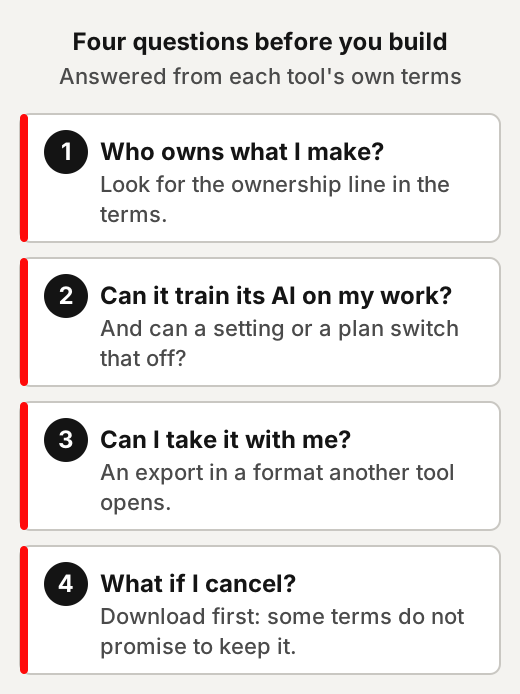
The answers sit in places that are easy to skip: the terms of service, the privacy policy and the pricing page. A plan’s name rarely tells you. For example, two plans of the same tool can treat your designs differently when it comes to training its AI. The Uizard section shows how.
“You own it” in a tool’s terms is not the whole story. Those words settle things between you and the company. Whether the law protects what you made is a separate question.
In the US, the Copyright Office’s January 2025 report says copyright “does not extend to purely AI-generated material”. It says that with current generally available technology, prompts alone do not give enough control. Using AI to assist rather than stand in for human creativity does not affect copyright in the output, it adds. Whether human contributions to AI output are enough for authorship is decided case by case, the report says.
That report covers US law only. Our reading: two designs can carry the same “you own it” line in a tool’s terms. Yet under the report, one you reworked by hand may be treated differently from one taken straight from a prompt.
2. A small iPhone app: Superapp
Superapp says it turns a description into an Apple app and, on its paid plans, prepares the App Store submission for you. Connect your Apple Developer account, it says, and it prepares the build, screenshots, privacy declarations and submission for you. It says it builds apps for iPhone, iPad, Apple Watch and Mac, plus a website for the app. You can build in any browser, or in a Mac app that needs a one-time Xcode setup.
Using Superapp
Describe the app in plain English, test it in the preview, then publish with your own Apple account. Start small: one screen, one job.
Its FAQ says generating a whole screen uses about one credit, and small tweaks around 0.1 credits. So asking for one change at a time keeps the cost of each step low. For example, “a habit tracker with a daily checklist” is a first screen; “add a weekly chart” is the next request.
Superapp says you need an Apple Developer account only when you are ready to publish. Apple lists its Developer Program as a $99 annual membership. That fee is Apple’s, on top of any Superapp plan.
On 27 October 2026 its pricing page listed Pro at $25 a month for 50 credits. Business was $50 for 110 credits, and Max $100 for 230. Its FAQ says the free plan includes free credits to start “in most countries”.
What Superapp’s terms say
Superapp says you own your code and can export it; its terms also let it learn from what you make. Read both lines together.
Its FAQ answers “Can I export the code?” with “Yes. You fully own the code and can export it anytime”. Its terms say: “You retain rights to your own content, but you give us a license to use it internally”. That use includes: “We may analyze and learn from code generations, inputs, and outputs to improve functionality, safety, and quality”.
The same section adds: “We will not share your private code or data with third parties except as required by law, to provide the Services, or with your consent”. The terms and privacy policy we read describe no setting to opt out of that learning. Its privacy policy says that, depending on where you live, you may have rights to “restrict or object to certain processing”, by contacting the company. For example, weigh that before you type in an app idea you would rather keep to yourself for now.
Its terms also say “All fees are non-refundable unless required by law”.
Apple’s rules on app generators
Apple decides what goes on the App Store, and one of its rules is about app generators. We do not know how Apple applies it to any one tool. Read it before you plan around a launch date.
Apple’s App Review Guidelines say: “Apps created from a commercialized template or app generation service will be rejected unless they are submitted directly by the provider of the app’s content”. Another rule asks for “features, content, and UI that elevate it beyond a repackaged website”.
3. A clickable prototype: Uizard
Uizard says it turns a sentence into a multi-screen prototype, and a screenshot or a hand sketch into an editable design. A prototype is an early version you can show and test before anyone builds the real thing. Uizard lists generating multi-screen prototypes from text, turning screenshots into editable mock-ups, and turning hand-drawn wireframe sketches into digital designs.
For example, sketch a sign-up screen on paper, photograph it, scan it in, then ask for a second screen in words. If you need a site map or page structure rather than app screens, our guide to website visualizers covers those tools.
Uizard’s plans
The free plan is enough to try the idea; exports and code handoff grow with the plan. The free plan gives 3 AI generations a month, 2 projects and 10 free templates. On the free plan, export to JPG, PNG and PDF is “only 1x resolution”. Pro is $12 a month billed annually, with 500 AI generations a month and “Developer handoff React CSS”. For example, three generations a month is enough to test one idea, not to try many.
What Uizard’s terms say
You own your designs, but on the Free and Pro plans Uizard may use them to train its AI. Fine-tuning means training an existing AI model further on a particular kind of material, here designs.
Uizard’s terms say “you own all rights, title and interest in and to Customer Data”. Designs “created and uploaded by users of the Free and Pro plans may be used for the purpose of fine-tuning and training machine learning AI models”. Business and Enterprise designs “are not utilized” for that. Where designs are used, Uizard says it makes “reasonable efforts to anonymize and aggregate” them.
So the plan decides whether your screens can feed its AI. For example, a design that shows a product you have not announced falls under that clause on Free and Pro.
Export before you cancel. Its terms say that on cancellation “we are under no obligation to maintain or store your Customer Data”. If you ask in writing within 30 days of termination, its terms say Uizard “will make available to you a file containing Customer Data”.
4. A step-by-step how-to guide: Scribe
Scribe records you doing a task on screen and writes the guide for you, with screenshots. Its help centre describes a Scribe as “an automatically generated step-by-step guide with screenshots, text and cursor clicks”.
Using Scribe
Turn on capture, do the task once, stop, then tidy the steps. Its guide lists the order: turn on Scribe, complete your process and click Stop Capture, and the guide is generated. On all plans you can capture work in the browser with its Chrome or Edge extension. Capturing desktop apps needs Pro or Enterprise.
For example, record yourself exporting a monthly report from a spreadsheet once, and the next person who does it has a guide.
Screenshots show whatever is on your screen. Pro and Enterprise users can crop, annotate or redact screenshots after capture. On the free plan, close other tabs and use sample data before you record.
Scribe’s plans
The free plan works in the browser; exports to other formats come with Pro. Basic is free and runs in your browser. Pro Personal is $25 per seat a month billed yearly, or $35 monthly. It adds export to PDF, HTML and Markdown. For example, a free guide shared as a link stays on Scribe; a Markdown export can go into your own notes or wiki.
What Scribe’s terms say
You keep ownership, but you give Scribe a broad licence that includes training its AI. That licence covers the screenshots too.
Scribe’s terms say “Company does not claim ownership of User Content”. Section 4.2 of its terms (last modified 7 August 2026) also gives Scribe a “perpetual, irrevocable, non-exclusive, royalty-free, worldwide, fully-paid up, transferable and sublicensable” licence to use it, “including to train, fine-tune, validate, test, improve or deploy artificial intelligence and machine learning models”. The terms count screenshots, workflows, traces and videos as user content.
Its privacy policy says it may use your activity data, which includes clicks, keystrokes and screen content you have not redacted, along with usage, log and device information, to train its AI models “except to the extent you have enabled any applicable opt-out”. So look in your settings for one. For example, a guide you record inside a client’s system comes under the same licence as any other. The terms also say “any termination of Services may involve deletion of User Content”.
5. A logo: Canva
Canva’s logo maker is quick to use; its licence decides how far a logo made from its library can go. Canva says its logo maker is “made for non-designers” and points to its AI Logo Generator. For example, start from your business name and one colour, then adjust the layout and spacing yourself.
What Canva’s terms say
Canva says you own your design, but not the library pieces inside it, and AI results may not be unique.
Its terms of use say: “We never own your designs, but there may be certain restrictions depending on the types of Canva-provided content you’ve included in your designs”. Its AI Product Terms say you own your output, “except for any Output that modifies or incorporates Licensed Content”. They add that “outputs may not be unique, and other users may receive similar Outputs”.
Its content licence lists, among prohibited uses: “use any of the Content as part of a trade-mark, design-mark, trade-name, business name or service mark (excluding fonts)”. Canva’s help centre says its logo templates “can be used by anyone”, so “your rights to the logo are non-exclusive and you can’t register it as a trademark”. It says photos and graphics from its library come with only “a non-exclusive license”. For logos “that you can register as a trademark”, it describes designing one from scratch: “you can use simple lines and shapes from our Free library. You can also use all of our fonts”. A trademark is a word, symbol or design that tells people whose goods or services they are.
That is what Canva’s terms and help centre say, and we stop there. Whether a logo you made can be registered is a question for the trademark office where you are, or a lawyer.
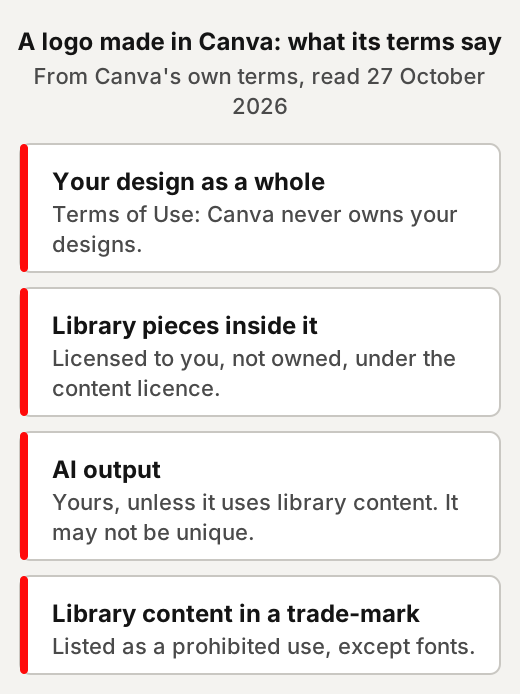
Canva’s privacy settings let you control whether your content can improve its AI features. Unless an account was closed for breaking its rules, you can download or export your designs before your subscription ends.
6. A simple website
For websites, we cover the builders, and what you can take with you, in our web design guide. Its table on no-code builders sets out what each builder’s own pages say about leaving. Superapp can also make a landing page for an app, published on your own domain.
For example, before you build, check whether the plan you want includes your own domain and a way to export the site.
7. Side by side
The four tools make different things and treat your work differently; this table puts the answers in one place. Prices are as each pricing page showed them on 27 October 2026.
| Tool | What you make | Free to start | Paid plans from | Your work and its AI |
|---|---|---|---|---|
| Superapp | Apple apps and an app website | Starter credits “in most countries” | $25 a month | Terms let it learn from inputs and outputs |
| Uizard | Clickable prototypes | 3 AI generations a month | $12 a month, billed annually | Free and Pro designs may train its AI |
| Scribe | Step-by-step guides | Basic, in the browser | $25 per seat a month, billed yearly | Licence includes training its AI |
| Canva | Logos and other designs | Free logo maker | Not recorded here | A privacy setting controls it |
We did not record Canva’s prices.
8. Who’s behind each tool
Each tool names the company behind it in its terms. We have no connection with any of them, accepted nothing from them, and earn nothing from these links.
- Superapp: its terms say it is operated by NZT48, Inc, and are governed by the laws of the State of Delaware.
- Uizard: its terms name UizardApp ApS, with a contact address of “Uizard c/o Miro” in Copenhagen.
- Scribe: its terms name Colony Labs, Inc.
- Canva: for billing addresses outside the US and UK, its terms name Canva Pty Ltd, in Australia.
Quick answers
Do I own what an AI app or design tool makes for me?
It depends on the tool's terms. Superapp says you fully own your code, Uizard's and Scribe's terms say you keep your content, and Canva says it never owns your designs. In the US, the Copyright Office says copyright does not extend to purely AI-generated material.
Can I publish an AI-built iPhone app on the App Store?
You need an Apple Developer account, which Apple lists as a $99 annual membership. Apple's guideline 4.2.6 says apps from an app generation service will be rejected unless they are submitted directly by the provider of the app's content.
Does Uizard use my designs to train AI?
Its terms say designs made on the Free and Pro plans may be used for fine-tuning and training machine learning AI models. Business and Enterprise designs are not used for that.
Does Scribe use my guides to train AI?
Scribe's terms give it a licence to use your content, including to train AI models. Its privacy policy refers to opt-outs made available in the service.
What does Canva's licence say about logos and trademarks?
Its content licence lists using its library content as part of a trade-mark, design-mark, trade-name, business name or service mark as a prohibited use, fonts excepted. For registering a logo, ask your country's trademark office or a lawyer.
Use this
Our checklist for trying any no-code AI tool, built from the four questions above.
If this tool closed tomorrow, what would I still have?
Quick quiz
Nothing is scored or saved. Recalling it once now is what makes it last.
1. On which Uizard plans may your designs be used to train its AI?
Answer: Free and Pro.Read it again ↑
2. What does Apple's guideline 4.2.6 say about apps from an app generation service?
Answer: They will be rejected unless submitted directly by the provider of the app's content.Read it again ↑
3. What does Canva's content licence say about using its library content in a trade-mark?
Answer: It is listed as a prohibited use, except fonts.Read it again ↑
How we checked this · Last checked October 2026
- We read the tool pages, terms and policies listed in the Sources on 27 October 2026, and Apple's developer pages the same day.
- Scribe's monthly and yearly prices were read in a browser, because its pricing page switches between them.
- We list only tools whose company, terms and licence we could read clearly, and we left out tools where we could not.
- We did not record Canva's prices, because its pricing page differs by country.
- The Copyright Office report covers US law only. Our wording on it matches our guide to AI side hustles.
Sources
- Superapp, home page and FAQ, pricing, terms (updated 26 October 2026) and privacy policy (updated 29 September 2026).Primary
- Apple, “Apple Developer Program” and “App Review Guidelines” (updated 16 October 2026).Primary
- Uizard, home page, pricing and terms of service (updated 25 January 2024).Primary
- Scribe, pricing, terms of use (modified 7 August 2026), privacy policy (updated 7 August 2026) and “New User Guide - Scribe 101”.Primary
- Canva, “Logo maker”, terms of use (effective 19 August 2026), AI Product Terms (effective 26 June 2026), Content License Agreement, and Help Center, “Trademark logos created on Canva”.Primary
- US Copyright Office, “Copyright and Artificial Intelligence, Part 2: Copyrightability”, January 2025, and its announcement.Primary
- US Patent and Trademark Office, “What is a trademark?”Primary
- GOV.UK Service Manual, “Making prototypes”.Primary
- Google for Developers, “Machine Learning Glossary”.Primary
Keep your idea in your own files
Each tool's terms decide what you keep, and they differ from tool to tool. Our view: write your idea, plan and wording in your own files first. Then each tool is a helper, not the only place your work lives.
Plan the app before you spend credits
- Write the first screen in one line. Our suggestion: one screen, one job, and who it is for.
- List the next changes separately. Superapp's FAQ puts a whole screen at about one credit, and a small tweak around 0.1. Ask for one change at a time.
- Keep ideas you'd rather not share out of prompts. Its terms say it may learn from code generations, inputs and outputs. The terms and privacy policy we read describe no opt-out setting. Our view: describe a private idea only roughly.
- Read Apple's rule before you set a launch date. Apple's guidelines say apps from app generation services will be rejected, with one exception. The exception is an app submitted directly by the provider of its content. We don't know how Apple applies it to any one tool.
This week: test one screen on one person
Our suggestion: sketch the one screen your idea can't do without, and turn it into a clickable prototype. Show it to one person who might use it. Note where they get stuck before you change anything. Use sample names and data, since Free and Pro designs may be used to train Uizard's AI.
Before a logo becomes your brand
- Decide if you may want to register it. Our view: answer this before you pick a starting point, not after.
- Know what a template gives you. Canva's help centre says its logo templates can be used by anyone. So, it says, your rights to such a logo are non-exclusive and you can't register it as a trademark.
- Read Canva's own route. For logos you can register as a trademark, its help centre describes designing one from scratch. It mentions simple lines and shapes from its Free library, and its fonts.
- Keep dated drafts. Our suggestion: save a dated copy each time the logo changes. Then you have a record of how it was made.
- Ask before you register. Your country's trademark office or a lawyer can tell you whether your logo can be registered.
Put these skills to paid use
- Turn a small business's routine tasks into step-by-step guides, recorded with sample data. Show the business the tool's licence first.
- Build a clickable prototype for someone who wants to test an app idea before paying to build it. Read the tool's training terms together first.
- Keep a client's designs and guides exported to files they control, outside any one tool.
Ideas to explore, not financial or business advice. No result is promised.
Keep going
- The Web Design Resource LibraryIts no-code builders table sets out what each builder's own pages say about leaving.
- Website visualizers comparedSitemaps, crawl maps and AI structure tools for planning a site.
- AI design tools, checkedAI design tools and component libraries: what each is, its licence and its catch.
- AI side hustlesIdeas, what the work involves, and the rules that decide whether each one works.
- GlossaryPlain meanings of prototype, fine-tuning and trademark.