

Start hereCodeium, Windsurf and Devin Desktop are names for one line of tools, which changed owner along the way. Cursor still carries its old name, yet it is now part of SpaceX. So which name, and which terms, apply to you today?
AI coding tools change names and owners fast, so advice written a year ago may point at a name that no longer exists. Below: what these tools are called now, who runs them, how to start, and what their terms say about your code. Prices and terms are as of October 2026.
1. The short list
These tools changed their name or their owner; here is what each is now.
| Older name | Name now | Who runs it now | What changed |
|---|---|---|---|
| Codeium, then Windsurf | Devin Desktop | Cognition | Renamed twice; Cognition agreed to buy it in 2025 |
| Cursor | Cursor | Part of SpaceX | Bought in August 2026 |
| Supermaven | Folded into Cursor | Cursor | Joined Cursor in 2024; sunset in 2025 |
| Claude Code SDK | Claude Agent SDK | Anthropic | Renamed in September 2025 |
Why it matters: a tutorial that says “open Windsurf” or “install claude-code-sdk” points at an old name. Menus, package names and terms may have moved. For example, if a guide tells you to install the old Python package, the current one has a new name (see section 4).
2. Devin Desktop (formerly Codeium, then Windsurf)
Codeium became Windsurf, and the Windsurf editor is now Devin Desktop, made by Cognition.
How the names changed
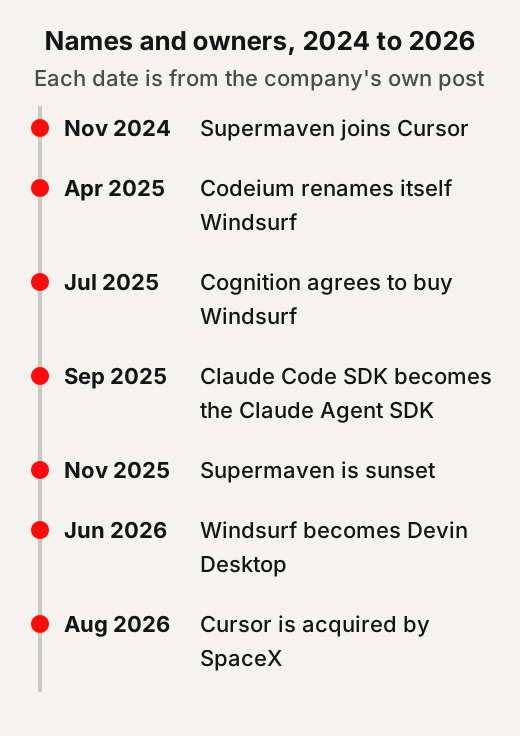
The company’s own posts date each step. The company says it began as Exafunction in 2021 and rebranded to Codeium in 2022. It launched the Windsurf Editor in November 2024. On 4 April 2025 the company renamed itself Windsurf, and said it would rename its Codeium extensions the Windsurf Plugins.
On 14 July 2025 Cognition, the maker of the Devin coding agent, said it had signed a definitive agreement to acquire Windsurf. Cognition said the deal included Windsurf’s IP, product, trademark and brand.
On 2 June 2026 Cognition renamed Windsurf to Devin Desktop. Its help pages call Devin Desktop “the new name for Windsurf”, the same IDE with the same features. Cognition describes it as a full IDE, a program for writing code, with an agent manager built in.
Old web addresses still work. When we checked on 27 October 2026, codeium.com forwarded to windsurf.com, which forwarded to devin.ai/desktop.
How to start
There is a free plan, and you can use it without Cognition’s cloud agent.
Cognition’s install page offers downloads for Mac, Windows and Linux. Its help pages say you can use Devin Desktop with local-only agents, without Devin in the cloud. If you used Windsurf, Cognition says Devin Desktop arrived as a standard update, with your plan, pricing and extensions unchanged. Your old Windsurf rule files are still read.
For example, open a small practice project first, ask the agent to explain one file, and read what it suggests before you accept anything.
What it costs, as of October 2026
There is a free plan, two paid personal plans and a team plan. On 27 October 2026 Cognition’s pricing page listed a Free plan at $0 with a “Light quota to code with agents”. Pro was $20 per month and Max $200 per month. Teams was $80 a month for the team plan plus $40 a month per full developer seat. Prices can change, so check the page on the day.
What its terms say about your code
Cognition’s terms say it may use your data for model training, with an opt-out on paid plans. We quote the terms; we do not say what they mean for your situation.
Cognition’s platform terms were last updated on 30 June 2026. Windsurf’s old address for its individual terms now forwards to these platform terms. They say: “Cognition may use Customer Data for model training purposes and to improve and enhance the Services”. They go on: “If you subscribe to a paid Service Tier, you may opt out of this use”. On the Teams tier, only an administrator may use that opt-out.
The same terms say Cognition assigns to you “all right, title, and interest in Output”. They add that outputs “may be similar to or the same as Outputs provided to other customers”. For users who signed up for Windsurf under Exafunction, the terms say “Cognition” means Exafunction, Inc., unless the licence has been assigned. So, for some older Windsurf users, the terms name a different company.
3. Cursor, and Supermaven, now part of SpaceX
Cursor kept its name but changed owner, and Supermaven had already joined it.
What happened
Supermaven joined Cursor in 2024 and was sunset in 2025; Cursor itself joined SpaceX in 2026. On 12 November 2024 Cursor announced that Supermaven, an AI code-completion tool, was joining it. At the time, Cursor said the Supermaven plugin would stay maintained. On 21 November 2025 Supermaven announced it was sunsetting the product and recommended that existing VS Code users move to Cursor. It said free autocomplete would continue for existing customers “for the foreseeable future”, and that agent conversations would end.
On 21 April 2026 Cursor announced a partnership with SpaceX on training its models. On 14 August 2026 Cursor said it “has officially been acquired by SpaceX”. The page footer still names Anysphere, Inc., the company that makes Cursor.
How to start, and what it costs
Cursor’s plans are now sold as an X subscription, bundled with Grok and X features. That changes what each plan includes.
On 27 October 2026 Cursor’s pricing page listed a Free plan at $0 a month. Plus was $8 a month, and the page says only Grok models are available on it. Premium was $30, Super $100 and Ultra $200 a month. Teams started at $30 per user per month. The page says third-party model usage is not included in those prices and must be bought separately. It also says subscriptions are sold only through X Subscription Corp.
For example, if you want a specific outside model, check whether your plan covers it; the page lists that as a separate charge.
What its terms say about your code
Cursor’s training use depends on one setting, called Privacy Mode.
Cursor’s data-use page was last updated on 3 September 2026. It says that with Privacy Mode on, “Customer Data will not be used for training by Cursor”. The same page says that if prompts trigger abuse detectors, data may be stored for investigation, and that models without zero-data-retention agreements are marked as such or need an admin to enable them. With Privacy Mode off, it says: “we may use and store codebase data, prompts, editor actions, code snippets, and other code data and actions to improve our AI features and train our models”. It adds that requests still go through Cursor’s backend even when you use your own API key.
4. The Claude Agent SDK (formerly the Claude Code SDK)
A toolkit for building your own agents kept its makers but changed its name.
On 29 September 2025 Anthropic said it was renaming the Claude Code SDK to the Claude Agent SDK. Anthropic says the change reflects the SDK’s broader capabilities for building agents beyond coding tasks.
How to start
It is a library for programmers, used from Python or TypeScript with an API key.
The quickstart lists Node.js 18 or later, or Python 3.10 or later, as prerequisites. It says to get an API key from the Claude Console and set it as an environment variable. The Python package changed from claude-code-sdk to claude-agent-sdk. The TypeScript package changed from @anthropic-ai/claude-code to @anthropic-ai/claude-agent-sdk.
For example, if an older tutorial imports claude_code_sdk, the migration guide shows the new import, claude_agent_sdk.
What the terms say about your code
Anthropic’s terms for its API say it may not train models on your content. Anthropic’s SDK documentation says use of the Claude Agent SDK is governed by its Commercial Terms of Service. Those terms took effect on 17 June 2025. They say: “Anthropic may not train models on Customer Content from Services”. They also say services under those terms “are not for consumer use”. Anthropic describes the SDK as a way to embed Claude Code’s agent in your own application, in a process you operate. Our page on who makes today’s leading AI models covers the labs behind the models.
5. Two more tools we cover elsewhere
One renamed assistant has its own page; one app builder is covered in our no-code guide.
The self-hosted assistant that started as Clawd, then Moltbot, announced its new name, OpenClaw, on 29 January 2026. Our page on Clawdbot, now OpenClaw covers its names, what it does and its security record.
Superapp says it turns a description into an Apple app, plus a website for the app. Its terms say it is operated by NZT48, Inc. When we checked on 27 October 2026, superappp.com forwarded to superapp.dev. Its terms say “You retain rights to your own content, but you give us a license to use it internally”. The same terms, last updated 26 October 2026, add: “We may analyze and learn from code generations, inputs, and outputs to improve functionality, safety, and quality”. Our guide to building without code covers it in full.
6. Before you let an agent run commands
An agent that can run commands on your computer can also run the wrong ones. The safeguards below come from a national cyber agency and from the tools’ own documentation.
What the tools themselves say
Each tool documents what its agent may do without asking you, and how to change that. Cursor’s security page says AI can behave unexpectedly due to prompt injection, hallucinations and other issues. Prompt injection means instructions slipped into a file, a web page or other input that the agent reads and may follow.
Cursor says terminal commands need your approval by default. It calls its auto-run options “best-effort guardrails rather than a hard security boundary”. It notes that agents can change workspace files without approval, except configuration files, and says: “Always use version control so you can revert changes”. For repositories you do not trust, it suggests using a basic text editor instead.
Devin Desktop’s local agent is now Devin Local; new conversations no longer start on the older Cascade agent. Devin Local uses allow, ask and deny rules, and supports OS-level sandboxing. The older Cascade agent used four auto-run levels, from Disabled to Turbo. At Turbo, “All commands are auto-executed immediately, except those in your deny list”.
Anthropic’s deployment guide says Bash commands can run in a sandbox that restricts file and network access. A sandbox is a walled-off space where a program can only reach what it is allowed to. For high-security set-ups, the same guide describes keeping API keys outside the agent’s environment, behind a proxy, so the agent never sees them.
What the UK’s cyber agency says
The NCSC advises organisations to isolate agents doing high-risk work and to match oversight to the stakes. The UK’s National Cyber Security Centre (NCSC) published guidance on agents for organisations in August 2026. For high-risk work, it says the most robust approach is to run an agent in an isolated, disconnected environment. Where possible, it says, deny all network traffic to the agent’s environment by default and allow only what is needed. It also says: “do not rely on prompting alone”.
In June 2026 the NCSC said different code deserves different levels of care and oversight. It names authentication logic, sensitive personal data and secrets such as tokens as cases that need more care.
For example, a throwaway demo and the code that checks passwords on a real website are not the same job. Our cybersecurity crash course explains the basics, and our page on chatbots and AI agents explains what makes an agent different.
7. How to check a renamed tool yourself
Four quick checks tell you who runs a tool now and what you agree to. This is our own method, not a rule from any of the companies.
- Type the old web address and see where it lands. A forward to a new name is the first clue.
- Find the company’s own announcement of the change, with a date, on its blog or help pages.
- Open the terms and note the “last updated” date and the company named as the other party.
- Search the terms for “train” and for “opt out” to find what they say about your code.
For example, when we typed codeium.com, it landed on devin.ai, and Cognition’s own blog dated each step.
Quick answers
What happened to Windsurf?
Cognition agreed to buy Windsurf in July 2025 and renamed it Devin Desktop on 2 June 2026. Cognition says existing Windsurf users got it as a standard update.
Who owns Cursor now?
On 14 August 2026 Cursor said it had officially been acquired by SpaceX. Its page footer still names Anysphere, Inc.
Is Codeium still available?
Codeium is an older name. The company renamed itself Windsurf in April 2025, and Windsurf is now Devin Desktop.
What happened to Supermaven?
Supermaven joined Cursor in November 2024 and announced its sunset in November 2025. It recommended that existing VS Code users move to Cursor.
Does Devin Desktop train on my code?
Cognition's terms say it may use customer data for model training. They say paid subscribers may opt out; on the Teams plan, only an administrator can.
Use this
Our own method for any renamed tool, built from how we checked the ones above.
Whose terms am I agreeing to today, under the tool's current name?
Quick quiz
Nothing is scored or saved. Recalling it once now is what makes it last.
1. What is Windsurf called now?
Answer: Devin Desktop.Read it again ↑
2. In Cursor, which setting decides whether your data may be used for training?
Answer: Privacy Mode.Read it again ↑
3. What did the Claude Code SDK become?
Answer: The Claude Agent SDK.Read it again ↑
How we checked this · Last checked October 2026
- We read each company's own announcement for every rename and sale, and its current pricing, terms and security pages, on 27 October 2026.
- We followed the old web addresses ourselves to see where they lead today.
- Terms are quoted, not interpreted. What they mean for your own use is a question for the terms themselves or a lawyer.
- Prices change often; this page will be rechecked by the end of December 2026.
- Superapp is covered fully in our guide to building without code; here it gets one line.
Sources
- Windsurf (now on Cognition’s site), “The Next Chapter: Renaming to Windsurf”, 4 April 2025.Primary
- Cognition (Scott Wu), “Cognition’s acquisition of Windsurf”, 14 July 2025.Primary
- Cognition, “Windsurf is now Devin Desktop”, 2 June 2026.Primary
- Cognition, “Devin Desktop FAQ”, “Install Devin Desktop”, “Terminal” and “Devin Local”, Devin Docs.Primary
- Cognition, “Devin Plans and Pricing”, read 27 October 2026.Primary
- Cognition, “Platform Terms of Service”, last updated 30 June 2026.Primary
- Cursor (Michael Truell), “Supermaven joins Cursor”, 12 November 2024.Primary
- Supermaven, “Sunsetting Supermaven”, 21 November 2025.Primary
- Cursor, “Cursor partners with SpaceX on model training”, 21 April 2026, and “Cursor is now a part of SpaceX”, 14 August 2026.Primary
- Cursor, “Pricing”, read 27 October 2026; “Data Use & Privacy Overview”, last updated 3 September 2026; “Agent Security”, Cursor Docs.Primary
- Anthropic, “Building agents with the Claude Agent SDK”, 29 September 2025.Primary
- Anthropic, “Agent SDK overview”, “Migrate to Claude Agent SDK”, “Quickstart” and “Secure deployment”, Claude Code Docs.Primary
- Anthropic, “Commercial Terms of Service”, effective 17 June 2025.Primary
- OpenClaw, “Introducing OpenClaw”, 29 January 2026.Primary
- Superapp (NZT48, Inc), home page, read 27 October 2026, and “Terms”, last updated 26 October 2026.Primary
- UK National Cyber Security Centre, “Managing the cyber risk of agentic AI”, 20 August 2026, and “The ‘vibe coding spectrum’ approach to AI-assisted software development”, 18 June 2026.Primary
- NIST Computer Security Resource Center, Glossary, “sandbox”.Scholarly
Check the name before the tutorial
A tutorial under an old name can send you to old menus, packages and terms. Our view: before you follow one, find what the tool is called now. Then read whose terms you agree to under that name.
Your first session with a coding agent
- Open a small practice project. Our suggestion: use something small and separate from your real work.
- Ask it to explain one file. Our suggestion: let it describe the code before you ask it to change anything.
- Read before you accept. Our view: read each suggested change, and accept only what you understand.
- Start on a free plan. Devin Desktop and Cursor both listed a Free plan in October 2026. Prices change, so check the page on the day.
Goes with: 2. Devin Desktop (formerly Codeium, then Windsurf) ↑
This week: find your training setting
Our suggestion: open the coding tool you use and find what its terms say about training. In Cursor, it depends on one setting, Privacy Mode. Cognition's terms offer an opt-out on paid plans; on Teams, only an administrator can use it. Write down the setting and the date you checked.
Before an agent runs commands
- Approval for commands. Cursor says terminal commands need your approval by default. It calls its auto-run options "best-effort guardrails rather than a hard security boundary".
- A way back. Cursor's security page says: "Always use version control so you can revert changes".
- Repositories you don't trust. For repositories you do not trust, Cursor suggests using a basic text editor instead.
- API keys, in high-security set-ups. Anthropic's deployment guide describes keeping API keys outside the agent's environment, behind a proxy.
- More care for sensitive code. The NCSC names authentication logic, sensitive personal data and secrets such as tokens as needing more care.
- Isolation for high-risk work. For organisations, the NCSC calls an isolated, disconnected environment the most robust approach. It adds: "do not rely on prompting alone".
Turn careful checking into work
- Offer to update a creator's older tutorials to the current tool and package names. Link the dated announcement for each change.
- Run our renamed-tool checks on a small team's coding tools. Hand them each tool's current name, the company in its terms, and its training lines.
- Set up a practice project for a team trying a coding agent, with version control on. Check the tool's training setting before any client code goes in.
Ideas to explore, not financial or business advice. No result is promised.
Keep going
- Clawdbot, now OpenClawWhat Clawdbot became, how it works, and the security record of it and Moltbook.
- Build something without codeMake a small app, a prototype, a how-to guide or a logo, and know what you keep.
- Cybersecurity crash courseA plain-words cheat sheet on scams, attacks and protections.
- Chatbot vs AI agentOne talks with you, the other takes steps for you. Here is where the line sits.
- GlossaryThe plain meaning of API key, prompt injection, sandbox and other terms used on this site.