Start hereSuno's Pro plan comes with commercial use rights. Yet its terms make no promise that any copyright will vest in your song. So what exactly do you get when an AI tool makes a gift for you?
AI tools can now turn a few family details into a gift: a song, a picture book, a cookbook or a shortlist of presents. Below is how to use four of them, and what each one’s terms let you do with the result. We also look at what official guidance says about sharing a child’s details. Prices and terms are as they stood in October 2026.
We used no accounts, bought nothing and accepted nothing from these sites. No link on this page earns us anything.
At a glance
Each tool makes a different thing, and its own terms decide what you may do with the result.
| Tool | What it makes | Cost, as of October 2026 | What its terms say about the result | Age rule in its terms or privacy policy |
|---|---|---|---|---|
| Suno | A sung song from a prompt or your own lyrics | Free plan without monthly downloads; Pro from $8 a month, billed yearly | Paid plans: Suno assigns its rights in your songs but promises no copyright; free plan: personal, non-commercial use only | 13 or older; under 18 needs a parent’s consent |
| Gemini Storybook | A 10-page illustrated storybook with narration | Part of the Gemini app, which has a free plan | Google won’t claim ownership of content you generate | 18 or older for Storybook |
| Canva | A cookbook from a template, with AI pictures if you want them | Free plan; we did not record paid prices | You own your design; AI output is yours unless it uses Canva’s library content | No children under 13 (or a higher local consent age), except through Canva Education |
| DreamGift | Gift ideas with Amazon links | Free | Suggestions with Amazon links; its terms bar commercial reuse of its content without written permission | 18 or older |
1. What “you get a licence” means
A licence is permission to use something in set ways; it is not the same as owning the copyright.
Each tool below comes with a set of rules for what it makes. The rules differ, so it helps to read them as a list of what you may and may not do. In practice: save a copy of the terms, with their date, next to the file you made.
Suno shows the gap clearly. Its terms hand paid users whatever rights Suno holds in a song. Yet they say Suno “makes no representation or warranty to you that any copyright will vest in any Output”. So a licence or an assignment from the tool does not settle whether anyone owns a copyright at all.
There is a wider question about whether AI-made work can be owned. In the US, the Copyright Office’s January 2025 report says copyright “does not extend to purely AI-generated material”. It says that with current generally available technology, prompts alone do not give enough control. Our page on AI side hustles covers that report in more detail. These are US positions; other countries set their own rules.
For a family cookbook, the recipes raise a separate point. The US Copyright Office says “a mere listing of ingredients or contents, or a simple set of directions, is uncopyrightable”. It adds that a recipe that creatively explains or depicts how or why to do something may be copyrightable, as may photographs or illustrations. For example, Grandma’s ingredient list and her funny note about burning the first batch are two different things under that guidance.
2. Keeping children’s details private
Official guidance asks you to think before sharing anything that could identify a child.
None of the guidance below is written about these four tools. It is general advice on sharing children’s photos and information online, and on what online services must do. Our reading: typing a child’s details into an AI tool is one more way of sharing them.
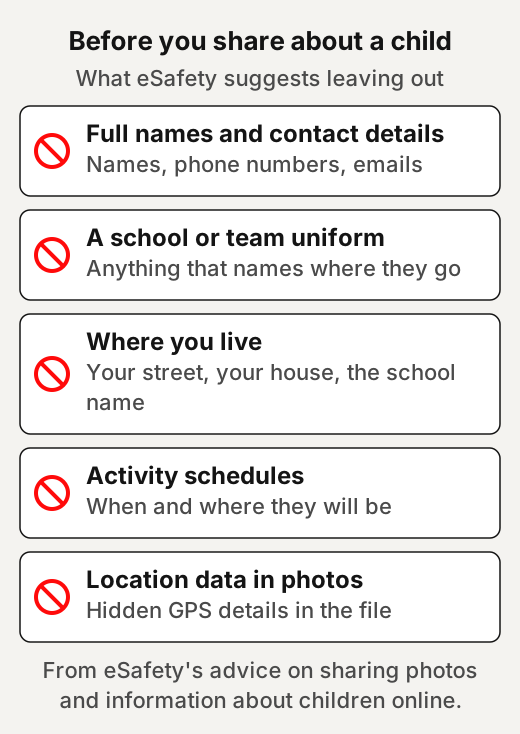
Australia’s eSafety Commissioner warns that images shared online could be harvested for unintended purposes, including to train AI tools and create deepfakes. It suggests avoiding photos or videos that contain full names, personal contact information or uniforms that identify a school or team. It also suggests making sure your child’s activity schedules are not shared online. It adds that comments should not identify locations, such as a street address or the name of your child’s school. In short, eSafety’s list is about details that could identify a child or show where to find them.
Photos carry more than the picture. eSafety calls the hidden details in a photo file its metadata. It says most digital photos and videos contain hidden information about the time, date and GPS coordinates of where they were taken. That matters here because Gemini Storybook invites you to upload family photos.
eSafety notes that you do not legally have to ask your child before sharing their photos or videos. It says involving them in the decision gives you a chance to demonstrate good practice. For example, you could show your child the storybook character before you make it, and ask whether they are happy for it to carry their name.
In the US, the rule to know is COPPA, which sets duties for the companies that run online services. The FTC says the COPPA Rule protects children’s personal information on websites and online services directed to children under 13, and also applies to general-audience sites that know they are collecting it from children that age. It lists photos, videos and audio recordings of a child as personal information. Parents have the right to review what was collected about their child and to retract their consent at any time, it says. The FTC asks people to report a site they think has broken the law at ReportFraud.ftc.gov.
In the UK, the Children’s code does a similar job for services. The ICO’s Children’s code sets fifteen standards for online services likely to be accessed by children. The ICO says a service likely to be accessed by children under 18 is probably covered, even if it is not aimed at them. Its introduction lists providing a high level of privacy by default among the things a service may need to do.
All four tools set an age in their terms or privacy policy. Suno and Canva start at 13, with exceptions, while Gemini Storybook and DreamGift are for adults. So the person typing is meant to be a teenager or an adult, but the details are still about the child. Our reading: a first name or a nickname is enough to make a song or a story feel personal.
3. A song with Suno
Suno writes and sings a song from a short description or from lyrics you write yourself.
Its home page says you can start from “a melody in your head, lyrics you’ve written, or just a feeling you want to hear”. For example, for a grandparent’s birthday you might write two verses yourself, with the nickname the grandchildren use and one family joke. Then ask for a style you know they like.
Listen to the whole song before you share it, and check that every name sounds the way the family says it.
What it costs. Its pricing page lists a free plan with “No monthly song downloads” and “No commercial rights”. Suno says songs stay playable and shareable on Suno on every plan. It says free users who joined on or after 3 September 2026 may occasionally receive trial downloads, and can buy downloads. The Pro plan is listed at $8 a month billed yearly, with 20 song downloads a month and commercial use rights. So on the free plan you can play and share a song on Suno, but a file to keep may need a paid plan or a bought download.
What you may do with the song. Suno’s terms say that on the Pro and Premier plans, Suno assigns you all of its right, title and interest in the songs you make, subject to its terms. As noted above, it makes no promise that any copyright will vest in them. On the free or basic tier, its terms limit songs to lawful, personal and non-commercial purposes. Its terms allow commercial use only of a song you have downloaded through an approved channel, within your plan’s download allowance. Its pricing page points readers to “the terms of service for limitations on commercial use”. Its home page says paid subscribers’ songs are “yours to keep”; we went by its terms, which carry the limits.
Your details. Its terms say you may not use Suno to post private information about any other person without their express consent. Its privacy notice says Suno uses certain submissions and other content to train and enhance the models that power its services. Its terms say that if you include personally identifiable information in what you submit, Suno may republish it. They also give Suno a perpetual, irrevocable licence to use your content, and to make it available to other users as necessary to provide the service. Its Voices feature has a firm rule: the terms say you can only create a voice model that resembles your own voice. So a song cannot be sung in a grandparent’s own voice under those terms.
Worth knowing:
- Operator: its terms name Suno Inc. The terms we read take effect from 3 September 2026.
- Its terms say you must be at least 13, and under-18s need a parent’s or guardian’s consent.
- Have I Been Pwned lists a Suno data breach from November 2025 that came to light in July 2026, with over 55 million email addresses. TechCrunch reported it on 21 July 2026.
- Record labels sued Suno in US federal court in June 2024. Warner Music Group announced in November 2025 a partnership with Suno that also settles their earlier litigation. For what was filed, settled and is still open, see our page on AI music generators and the lawsuits.
4. A picture book with Gemini Storybook
Gemini Storybook turns a short description, and photos if you add them, into a 10-page illustrated book with narration.
Google’s page says you describe the story you want, add files and photos if you like, and Gemini creates a unique 10-page storybook. Its launch post lists styles from pixel art and comics to claymation, crochet and colouring books, in more than 45 languages. For example, a bedtime story about a dragon who is scared of the dark could star a toy your child already owns.
You can’t edit text directly on the page; you ask Gemini to refine it, and it makes a new version with all new images. So check every page of the final version, since a new version can change pictures you liked. You can share a storybook through a public link, print it from your web browser, or listen to it through narration. Narration is limited to certain languages.
What it costs. Storybook is a feature of the Gemini app. Gemini has a free plan with a Google Account. We did not record its paid plan prices.
What you may do with the book. Google’s terms say some of its services let you generate original content, and Google won’t claim ownership over that content. The Copyright Office points in section 1 still apply to a book made mostly from prompts.
Your details. Google’s page suggests uploading photos of your family, pets or a special place to make the story yours. Gemini’s privacy hub says human reviewers, including trained reviewers from Google’s service providers, review some of the data it collects. It asks you not to enter confidential information that you wouldn’t want a reviewer to see or Google to use to improve its services. Our reading: that is where eSafety’s list from section 2 comes in, before you upload a child’s photo.
Worth knowing:
- Operator: Google’s terms name Google LLC, and Google Ireland Limited for users in the European Economic Area and Switzerland. The terms we read are effective from 30 July 2026.
- Google’s page says Storybook is available to all Gemini users over the age of 18. Workspace and student accounts can’t share storybooks.
- Google announced Storybook on 5 August 2025. Publishers Weekly reported the launch and a mixed response. It described one review that found characters sometimes looked different from scene to scene.
5. A family cookbook with Canva
Canva gives you cookbook templates to fill in, and an AI image generator for dishes you have no photo of.
Canva offers free, customisable cookbook templates. You type or paste each recipe into the template. For example, you could photograph a stack of family recipe cards, type them up, and add a scan of the handwriting to the page beside each recipe.
Its AI Image Generator turns a written prompt into an image, in a style and shape you choose. Canva says it reviews prompts automatically for terms that might generate inappropriate content. You can export designs as JPG, PNG, PDF or PPTX, so a PDF can go to a home printer or a print shop.
What it costs. Canva says Canva Free is available to anyone. We did not record its paid plans’ prices.
What you may do with the book. Its terms of use say: “We never own your designs, but there may be certain restrictions depending on the types of Canva-provided content you’ve included in your designs”. Its AI Product Terms say you own your output, “except for any Output that modifies or incorporates Licensed Content”. They add that “outputs may not be unique, and other users may receive similar Outputs”. So a cookbook to print for the family is one use; selling copies is another, and the library content inside it decides how far you can go.
Our page on building something without code looks at the same Canva terms for logos.
Your details. Canva’s privacy settings let you control whether your content can improve its AI features. For example, you can check that setting before you upload scans of handwritten cards.
Worth knowing:
- For billing addresses outside the US and UK, its terms name Canva Pty Ltd, in Australia. Its terms of use are effective from 19 August 2026. Its AI Product Terms are effective from 26 June 2026.
- Its terms say children may not use Canva, other than through Canva Education, and define a child as under 13 or under the minimum age to consent to data processing where the child lives.
- Have I Been Pwned lists a Canva data breach from May 2019 that affected 137 million subscribers.
- TechCrunch reported in April 2025 that Canva’s AI assistant can create images from your instructions.
6. Gift ideas with DreamGift
DreamGift is a free chat assistant that asks about the person and suggests gifts with Amazon links.
Its about page says it asks questions about the occasion and the person you are buying for. It says it pulls photos, descriptions and real-time price data from Amazon. Its home page says it covers more than 40 types of event, such as birthdays, weddings and housewarmings, and offers a version inside ChatGPT.
For example, instead of a name you could describe the person: “my sister, who loves bouldering and cooking Thai food, budget around twenty”. The tool needs interests and a budget, not identity.
How it is paid for. Its about page says DreamGift is free and earns money through an affiliation model, from purchases made through its suggested links. Its terms say it takes part in the Amazon Services LLC Associates Program. That means its shopping links lead to Amazon and can earn it a commission. Our reading: check the same item at another shop before you buy, since its links point to one shop.
Your details. Its privacy policy says it may collect your email address, name, phone number and social media profiles, plus usage data such as your IP address. It lists advertising cookies among the cookies it uses. Its terms say creating an account signs you up to its newsletters and marketing, which you can opt out of. For example, you can describe the person’s interests without giving their name.
Worth knowing:
- Its terms say some AI-generated content on the service may not be reliable, accurate, complete or truthful.
- Prices and availability are those shown on Amazon at the time of purchase, its terms say.
- Its terms say the service is only for people aged 18 or over.
- Operator: its terms name Lifehack Labs LLC. Its terms were last updated on 17 July 2025. Its privacy policy was last updated on 18 May 2023.
- Online since: the public registration record shows the dreamgift.ai domain was registered in May 2023.
- Fast Company wrote about DreamGift in December 2024.
Quick answers
Can I sell a song I made with Suno?
Not one made on the free plan: Suno's terms limit free-plan songs to lawful, personal and non-commercial use. On the Pro and Premier plans it assigns you its rights in your songs, subject to its terms, and allows commercial use of songs you have downloaded through an approved channel, but promises no copyright.
Can I print a Gemini storybook?
Yes. Google's Storybook page says you can print a storybook from your web browser, share it through a public link or listen to it through narration. Workspace and student accounts can't share storybooks.
Do I own a cookbook I design in Canva?
Canva says it never owns your designs, though Canva-provided content inside them may carry restrictions, and its AI terms say you own AI output unless it uses Canva's library content. In the US, a mere listing of ingredients is not protected by copyright, the Copyright Office says.
Is it safe to put my child's details into an AI tool?
We can't say for any one tool: no official guidance names these tools. Australia's eSafety Commissioner warns that shared images could be harvested to train AI tools, and suggests leaving full names, contact details, school or team uniforms and activity schedules out of photos and posts you share about a child.
Is DreamGift free?
Yes. Its about page says it is free and earns money from purchases made through its suggested links, and its terms say it takes part in the Amazon Services LLC Associates Program.
Use this
Pick the tool for the gift, then read its terms and privacy lines before you type anything personal.
Would I be happy for a stranger to read everything I typed about this person?
Quick quiz
Nothing is scored or saved. Recalling it once now is what makes it last.
1. What do Suno's terms promise about copyright in a song made on a paid plan?
Answer: No promise that any copyright will vest.Read it again ↑
2. Who can use Gemini Storybook, according to Google's page?
Answer: Gemini users over the age of 18.Read it again ↑
3. How does DreamGift pay for a free service?
Answer: Commissions when you buy through its links.Read it again ↑
How we checked this · Last checked October 2026
- We read each tool's home, pricing, terms and privacy pages on 27 October 2026, plus Suno's downloads update, Google's Storybook page and launch post, Canva's AI terms and DreamGift's about page.
- Canva's pages refuse scripts, so we read them in a browser. DreamGift's terms forbid automated access, so we read its pages by hand once.
- For Canva and Gemini we recorded which plans are free and no paid prices.
- We used no accounts, started no trials, bought nothing and accepted nothing from these sites.
- Where a tool's marketing and its terms differed, we went by its terms and said so on the page.
- The official guidance is from Australia's eSafety Commissioner, the US Federal Trade Commission and the UK Information Commissioner's Office; none of it names these tools.
Sources
The tools (read 27 October 2026)
- Suno: home page, pricing, terms of service (effective 3 September 2026), privacy notice (last modified 23 June 2026) and “An update to our downloads policy and Terms of Service” (10 August 2026).Primary
- Google: “Gemini Storybook”, “Create personal illustrated storybooks in the Gemini app” (5 August 2025), Gemini plans, Google Terms of Service (effective 30 July 2026) and the Gemini Apps Privacy Hub.Primary
- Canva: cookbook templates, AI Image Generator, pricing, terms of use (effective 19 August 2026) and AI Product Terms (effective 26 June 2026).Primary
- DreamGift: home page, about page, terms of service (17 July 2025), privacy policy (18 May 2023) and its domain registration record.Primary
Independent coverage and records
- Have I Been Pwned breach records for suno.com and canva.com.Primary
- TechCrunch, “AI music generator Suno breach affects 55M users, per Have I Been Pwned” (21 July 2026) and “Canva is getting AI image generation, interactive coding, spreadsheets, and more” (10 April 2025).Primary
- Recording Industry Association of America, announcement of the suits against Suno and Udio, 24 June 2024 (archived copy); Warner Music Group, “Warner Music Group and Suno forge groundbreaking partnership” (25 November 2025).Primary
- Publishers Weekly, “Google Launches Personalized Gemini Storybook App to Industry Concern” (21 August 2025).Primary
- Fast Company, “This new AI chatbot is your personal present-finding wizard” (22 December 2024).Popular
Official guidance
- eSafety Commissioner (Australia), “Privacy and your child” (last updated 15 September 2026).Primary
- US Federal Trade Commission, “Protecting Your Child’s Privacy Online”.Primary
- UK Information Commissioner’s Office, “Children’s code guidance and resources” and “Introduction to the Children’s code”.Primary
- US Copyright Office, “Copyright and Artificial Intelligence, Part 2: Copyrightability” (January 2025) and “Circular 33, Works Not Protected by Copyright”.Primary
Decide what the gift is for first
A family gift is made from other people's names and stories. Our view: decide first whether it stays in the family or might be sold. Suno's terms, for example, limit free-plan songs to personal, non-commercial use. Then type in only what the gift needs.
Before you type in a child's details
- Use a first name or nickname. Our view: that is enough to make a song or a story feel personal.
- Check eSafety's list. Australia's eSafety Commissioner suggests what to leave out of photos and posts about a child. Its list includes full names, contact details, uniforms that identify a school or team, and activity schedules.
- Mind what a photo carries. eSafety says most digital photos hold hidden information on the time, date and GPS location where they were taken. Our suggestion: remember that before uploading family photos to Storybook.
- Involve your child. eSafety says involving them in the decision gives you a chance to demonstrate good practice.
- Know what US parents can ask for. The FTC says the COPPA Rule covers online services for children under 13, and general-audience sites that knowingly collect from them. Under it, parents may review what was collected about their child and retract consent.
This week: one draft, one nickname
Our suggestion: make one draft gift on a free plan, using only a nickname. Gemini has a free plan, and Google says Storybook is for users over 18. Asking Gemini to refine a story makes a new version with all new images. So check every page of the final one before you share it.
Make family gifts for others
- Lay out a family's own recipe cards as a printed cookbook for them. Ask each cook before their name and notes go in. Canva says library content in a design may carry restrictions, so check what you used.
- Write lyrics for a client's family occasion and make the song on a paid Suno plan. Suno's terms allow commercial use only of songs downloaded through an approved channel, within your plan's allowance. They make no promise that any copyright will vest, so tell the client first. They also say Suno may republish personal details you submit. Use only details the people named have agreed to share.
Ideas to explore, not financial or business advice. No result is promised.
Use a gift finder lightly
- Describe, don't name. Our view: it needs interests and a budget, not who the person is.
- Know what an account means. Its terms say creating an account signs you up to newsletters and marketing, which you can opt out of.
- Treat ideas as a starting point. Its terms say some AI-generated content may not be reliable, accurate, complete or truthful.
- Compare before any purchase. Its links lead to Amazon and can earn it a commission. Our view: look at the same item at another shop.
Keep going
- AI music and the lawsuitsWho sued Suno and Udio, who settled, and which cases are still open.
- Build something without codeMake an app, a prototype, a guide or a logo, and know what you keep.
- AI side hustlesSide-hustle ideas, what each involves, and the rules that decide whether it works.
- Cybersecurity crash courseScams, attacks and protections, explained in plain words.
- GlossaryThe plain meaning of metadata, COPPA and other terms used on this site.