

Start hereScamwatch describes task-scam group chats where people who claim to be employees post screenshots of their earnings, and says the chat will be filled with scammers and bots. So how do you tell a clipping campaign from a pattern official guides warn about?
Some brands and creators pay clippers for the views their clips get. Around that work, some offers ask you to pay, or to hand over your account, before you earn anything.
Official consumer guides in the US, the UK, Australia and Canada describe these patterns. Below: five patterns, the signs those guides list, and what they say to do if you already paid.
1. The pattern: who pays first
In these scams, money or access goes from you to them before you get the pay you were promised.
The FTC lists three signs of a side hustle scam, and one is that scammers demand payment up front. Australia’s Scamwatch says to stop and check any job offer that requires you to pay money to make money.
The two clipping marketplaces we read for our other clipping pages work the other way round. Vyro’s FAQ says you sign up for free, connect your social accounts and browse open campaigns. Content Rewards’ creator terms charge a flat 10% creator fee on every CPM and Pool payout.
Our reading: on both, you pay nothing to start, and Content Rewards’ fee comes out of what you earn.
| Pattern | What you are asked for | Guides that describe it |
|---|---|---|
| Paying to join | A fee to join, a “recruitment fee”, or paid training | FTC, Scamwatch, Canadian Anti-Fraud Centre |
| Income courses | Money for a “proven system” that promises income | FTC |
| Fake campaigns | Your password, a sign-in code, or a software download | Google, YouTube Help, Citizens Advice |
| Fake earnings | Trust in screenshots, or a balance you cannot withdraw | Scamwatch, FTC, Canadian Anti-Fraud Centre |
| Task scams | A deposit to unlock tasks or your “earnings” | FTC, Scamwatch, Canadian Anti-Fraud Centre |
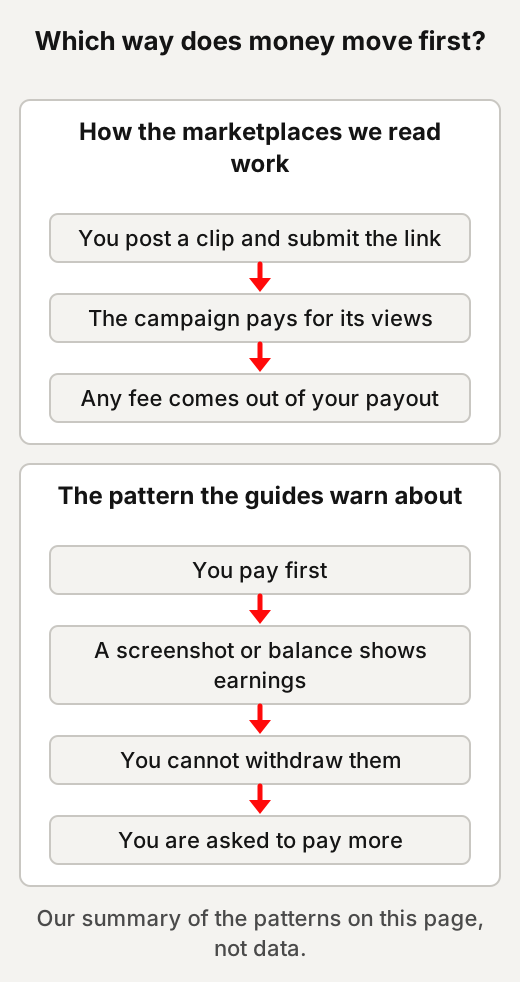
For example, a message offers a place in a “private clipping network” for a one-off access fee. In the pattern above, you pay before any clip has earned anything.
2. Paying to join a clipping “network”
Official guides treat a fee to get work as a warning sign, whatever the fee is called.
The FTC says honest employers never ask you to pay to get a job. Its side hustle alert says no legitimate gig will make you pay for expenses, training, or anything else to get the job.
Scamwatch lists being asked to pay a “recruitment fee” or for training materials before you begin the job and make any money. Canada’s Anti-Fraud Centre lists upfront deposits, “upgrade fees” or “unlock payments” as warning signs.
The name on the fee changes. It can be a joining fee, a “slot”, a verification fee or a starter kit. The FTC says some work-from-home job scams leave people paying for starter kits, so-called training, or certifications that are useless.
For example, “pay once to unlock the better-paying campaigns” is the kind of unlock payment the Canadian centre lists.
3. Courses that promise clipping income
A course can teach editing; the FTC’s warning signs are about what it promises you will earn.
Paying to learn a skill is not, by itself, a scam. The FTC’s guides look at the promises. The FTC says that if an offer “promises guaranteed income, large returns, or a ‘proven system,’ it’s likely a scam”. Its 2026 alert on business coaching scams says no one can guarantee you’ll make lots of money with little to no risk.
Success stories get the same caution. The FTC says to read success stories and testimonials with skepticism, because they “might not be true or typical”. It also tells readers to be ready for the upsell. It suggests asking what your specific expenses would be, and whether you can afford them.
In the US there is also a rule on earnings claims. The FTC’s Business Opportunity Rule bars US sellers of a business opportunity, as the rule defines one, from making an earnings claim without a reasonable basis and written proof. Whether a given course falls under that definition is a legal question this page does not answer.
For example, a sales page that says “follow my clipping system and replace your salary” makes the kind of promise the FTC describes. Five questions for any “easy money” claim are on our page about AI side hustles.
4. Fake campaigns that ask for a login or a download
Official guides say to keep passwords and sign-in codes private, and not to download files from untrusted sources.
Creators have been targeted this way before. In 2021, Google’s Threat Analysis Group described a phishing campaign that lured YouTube creators with fake collaboration opportunities. Once a creator agreed to the deal, the attackers sent a link to malware disguised as a software download.
They then took over the channel, and either sold it or used it to broadcast cryptocurrency scams. Google said the attackers moved targets to WhatsApp, Telegram or Discord. In other words, the offer was phishing, and the download was malware.
The platforms’ own advice is short. YouTube’s help page says not to share passwords or sign-in info with anyone else. It says the only access to your channel should be through accounts authorized with its channel permissions feature. It also says never to download files or software from a source you don’t trust.
The UK’s NCSC says that if you have any doubts about a message, contact the organisation directly, using the details from its official website. Our reading for clipping: look the campaign up on the marketplace’s own site, not through the link in a message.
For example, a “brand” offers you a paid clip but asks you to install a preview app first. That is close to the pattern Google described. More on phishing and hijacked accounts is in our cybersecurity crash course.
5. Fake earnings: screenshots, balances and small payments
A screenshot, a growing balance or a small first payment does not show that you will be paid.
Scamwatch describes task-scam group chats where people who claim to be employees post screenshots of their earnings. It says the group chat will be filled with scammers and bots.
The FTC says task scammers show what looks like more and more earnings in the app, and that these earnings are fake. Canada’s Anti-Fraud Centre lists seeing a balance on the website or app that you cannot withdraw as a warning sign.
Small payments are part of the pattern too. The FTC says task scammers might pay you a little, usually $5 to $20, to try to gain your trust. Scamwatch says scammers may deceive you by giving you a small payment for completing a job or task.
Another version runs the other way: money arrives, then you are asked to send some back. The FTC says an offer that includes depositing a check and then using some of the money for any reason is a scam. The FTC calls this a fake check scam: the check bounces, and the bank wants the full amount back.
A real screenshot can still be untypical, as the FTC says of testimonials. To trace where a screenshot came from, our page on checking something before you share it walks through four quick moves.
For example, a group chat full of payout screenshots, followed by an offer of a paid “premium” tier, combines two of the signs above.
6. Task scams that look like clipping work
Clipping pays for views on clips you post; a task scam promises pay for clicks, then wants a deposit.
Vyro’s FAQ describes the work as picking a campaign, following the brief, posting your clip and submitting the link. The FTC says task scams, or gamified job scams, begin with an unexpected message offering “work” such as “optimization” or “product boosting” online.
Canada’s Anti-Fraud Centre describes fake freelance work to “boost” products, apps or videos. Scamwatch says the tasks are simple and repetitive, such as buying or rating products and services or brands.
Then comes the deposit. The FTC says that to unlock the next tasks and get the “earnings” out, the scammer tells you to deposit your own money, usually in crypto. Scamwatch says scammers might also offer special tasks with a higher commission, which require you to pay more of your own money.
For example, a message offering money for liking and rating short videos is a task offer, not a clipping campaign.
7. Five things you may hear
None of these five holds up against the official guides we read.
You have to pay to join a clipping campaign
Doesn't hold up A real clipping campaign needs an upfront fee before you can join. Official guides call paying to get work a warning sign, and the marketplaces we read are free to join.
How sure: Strong the FTC, Scamwatch and Canada’s Anti-Fraud Centre all say the same.
The marketplaces we read cost nothing to join, and Content Rewards takes its fee from payouts, as section 1 shows.
A course can guarantee clipping income
Doesn't hold up A course or “system” can guarantee you a clipping income. The FTC says no one can guarantee you’ll make lots of money with little to no risk.
How sure: Strong the FTC says it plainly in two separate guides.
The FTC’s business offer guide says no one can guarantee that you’ll make money in business.
Payout screenshots show what you will earn
Doesn't hold up A screenshot of someone’s payout shows what you can expect. The FTC says success stories might not be true or typical, and Scamwatch describes scam chats full of earnings screenshots.
How sure: Strong the FTC and Scamwatch guidance point the same way.
A screenshot shows one result at best. It says nothing about clips that earned little or nothing.
A campaign needs your login to check your views
Doesn't hold up A brand needs your password or a sign-in code to check your clip’s views. YouTube says not to share passwords or sign-in info with anyone else.
How sure: Moderate YouTube’s rule covers YouTube channels; we did not read every platform’s rules for this page.
If an offer asks for the password itself, the signs in section 4 apply. On Vyro, you connect your social accounts and submit the link to your clip through Vyro.
A small first payment proves it is real
Doesn't hold up If they paid me a little, the job must be real. The FTC, Scamwatch and Canada’s Anti-Fraud Centre all describe small first payments used to win trust.
How sure: Strong three official guides describe the same move.
8. Signs to watch for, in the official guides’ words
Each sign below comes from an official consumer guide, credited in the same line.
- Big money for little effort. The FTC says to be wary of ads promising “fast cash” for “minimal work”.
- Pressure to decide now. The FTC says that if someone insists a gig will disappear unless you accept immediately, walk away.
- A message out of the blue. Scamwatch lists a recruiter contacting you unexpectedly by text or by messaging apps such as WhatsApp, Signal or Telegram.
- A very quick hiring process. Scamwatch lists a quick process with no interview or discussion about your qualifications, experience and references.
- Topping up an account to do tasks. Scamwatch lists being told to top up an account with your own money or cryptocurrency to complete tasks.
- A balance you cannot withdraw. Canada’s Anti-Fraud Centre lists seeing a balance you cannot withdraw.
- Being asked to recruit others. Canada’s Anti-Fraud Centre lists being asked to recruit others.
- Being asked for passwords or PINs. Citizens Advice lists being asked to give away personal information like passwords or PINs.
The NCSC says scammers aim to pressure you into acting without thinking. Our page on how emotional triggers work has a 30-second pause test.
9. If you paid or shared a login
The guides put the money first: contact whoever you paid through, then secure your account, then report it.
- The money. The FTC says to contact the company you used to send the money straight away, report the fraud, and ask to have the transaction reversed, if possible. Scamwatch says to contact your bank or card provider immediately and ask them to stop any transactions. In its advice on business email compromise, the FBI says that if you discover a fraudulent transfer, time is of the essence.
- Crypto. Canada’s Anti-Fraud Centre says cryptocurrency, in most cases, cannot be reversed.
- Your account. YouTube says recovering a hacked channel starts with recovering the Google Account linked to it. The UK’s NCSC says to log all devices and apps out of your account once you have changed your passwords.
- “Recovery” offers. In a 2023 warning about cryptocurrency investment schemes, the FBI says not to pay for services that claim to be able to recover lost funds.
- Report it. Scamwatch says to report a scam in the app where you found it, and to Scamwatch. The table below gives the main routes in four countries.
| Where you are | Report to | Phone |
|---|---|---|
| United States | ReportFraud.ftc.gov (FTC) | — |
| UK (England, Wales, Northern Ireland) | Report Fraud, reportfraud.police.uk | 0300 123 2040 |
| UK (Scotland) | Police Scotland | 101 |
| Australia | Scamwatch for scams; IDCARE, free help to make a plan to limit the damage | IDCARE 1800 595 160 |
| Canada | Canadian Anti-Fraud Centre, reportcyberandfraud.canada.ca | 1-888-495-8501 |
More countries are in the reporting table of our cybersecurity crash course.
Our other clipping pages cover how clipping pays, Whop Content Rewards, which clips earn and which get cut, fair use, and labelling a paid clip.
This page describes patterns that official guides document. It is not financial or legal advice, and it does not say that any particular offer, marketplace or course is a scam.
Quick answers
Do I have to pay to start clipping?
The two clipping marketplaces we read say you sign up for free, and one takes its fee from payouts. The FTC says no legitimate gig will make you pay for expenses, training, or anything else to get the job.
Are clipping courses a scam?
Paying to learn a skill is not a scam in itself. The FTC says an offer that promises guaranteed income, large returns or a "proven system" is likely a scam, and that testimonials might not be true or typical.
Why would a clipping campaign ask for my password?
YouTube's help page says not to share passwords or sign-in info with anyone else. In 2021, Google described fake collaboration offers to YouTube creators that led to malware and hijacked channels.
What should I do if I paid a clipping scam?
The FTC says to contact the company you used to send the money straight away and ask to reverse the transaction if possible. Then secure your account and report it, for example at ReportFraud.ftc.gov in the US or to Scamwatch in Australia.
Use this
Our checklist, built from the FTC, Scamwatch, Canadian Anti-Fraud Centre, NCSC and YouTube guidance above.
Am I being asked to pay, or to hand over access, before I am paid?
Quick quiz
Nothing is scored or saved. Recalling it once now is what makes it last.
1. What does the FTC's side hustle alert say about paying to get a gig?
Answer: No legitimate gig will make you pay to get the job.Read it again ↑
2. What does Scamwatch say about task-scam group chats full of earnings screenshots?
Answer: They are filled with scammers and bots.Read it again ↑
3. What does YouTube's help page say about sharing your password or sign-in info?
Answer: Don't share it with anyone else.Read it again ↑
How we checked this · Last checked October 2026
- We read the FTC's job-scam page and its alerts on side hustle, task and coaching scams, Scamwatch's job-scam page, the Canadian Anti-Fraud Centre's job-fraud page, NCSC and Citizens Advice guidance, YouTube Help and a Google security post, in October 2026.
- The patterns are described, not people. No marketplace, course, group or account is named or implied as a scam.
- Two official sites refuse automated requests, so their pages were read in a browser; one reporting site showed a block page and was not used directly.
- Official pages change, so we recheck this page by the end of January 2027.
Sources
US
- FTC Consumer Advice, “Job Scams”, March 2023.Primary
- FTC Consumer Alert, “How to avoid a side hustle scam”, 24 February 2026.Primary
- FTC Consumer Alert, “How to spot and avoid task scams”, 14 August 2025.Primary
- FTC Consumer Alert, “How to spot and avoid business coaching scams”, April 2026 (dated 18 May 2026 on the page).Primary
- FTC Consumer Advice, “When a Business Offer or Coaching Program Is a Scam”, August 2022.Primary
- US Federal Trade Commission, 16 CFR Part 437, Business Opportunity Rule (eCFR), §437.4.Primary
- FBI Internet Crime Complaint Center, public service announcements PSA240911 (September 2024) and PSA230314 (March 2023).Primary
UK
- National Cyber Security Centre, “How to spot a scam email, text message or call”, “Report a scam email”, “Report a scam text message” and “Recovering a hacked account”.Primary
- Citizens Advice, “Check if something might be a scam” (advice for England).Primary
Australia and Canada
- Scamwatch, “Jobs and employment scams”, read October 2026.Primary
- Canadian Anti-Fraud Centre, “Job” (date modified 16 January 2026) and “Report fraud and cybercrime”.Primary
Platforms and marketplaces
- Google Threat Analysis Group, “Phishing campaign targets YouTube creators with cookie theft malware”, 20 October 2021.Primary
- YouTube Help, “Recover a hacked YouTube channel” (answer 76187).Primary
- Vyro, home page and FAQ, read October 2026.Primary
- Content Rewards, “Creator Terms of Service”, last updated 4 October 2026.Primary
Check the pattern, not the sender
The US FTC lists payment up front as one of three signs of a side hustle scam. Australia's Scamwatch says to stop and check any job offer that requires you to pay money to make money. Our view: you can run that check on any offer without knowing who sent it.
Before you pay for a course
- Read what it promises. The US FTC says an offer that "promises guaranteed income, large returns, or a 'proven system,'" is likely a scam.
- Read testimonials with care. The FTC says success stories and testimonials "might not be true or typical".
- Ask what it costs in total. The FTC suggests asking what your specific expenses would be, and whether you can afford them. It also says to be ready for the upsell.
- Write down the skills it teaches. Our suggestion: list the editing skills the course says it covers. Paying to learn a skill is not, by itself, a scam.
Pause and check before you reply
- Give yourself time. The UK's NCSC says scammers aim to pressure you into acting without thinking. The US FTC says to walk away if someone insists a gig will disappear unless you accept immediately.
- Note anything you are asked to pay. Our suggestion: write down any fee you are asked for, and what it is called. The FTC says honest employers never ask you to pay to get a job.
- Find the campaign yourself. The NCSC says that if you have any doubts about a message, contact the organisation directly. It says to use the details from its official website. Our reading for clipping: look the campaign up on the marketplace's own site, not through a link in the message.
- Keep your login to yourself. YouTube's help page says not to share passwords or sign-in info with anyone else. Citizens Advice lists being asked for passwords or PINs as a sign that something might be a scam.
- Leave unknown downloads alone. YouTube's help page says never to download files or software from a source you don't trust.
Goes with: 4. Fake campaigns that ask for a login or a download ↑
This week: check one offer against the signs
Our suggestion: take one clipping offer you have seen, before you reply. Go through this section's signs one line at a time, and note any that match. Our view: a match is a reason to stop and check. It is not a ruling on who sent the offer.
Goes with: 8. Signs to watch for, in the official guides’ words ↑
If you paid or shared a login
- Start with the money. The US FTC says to contact the company you used to send the money straight away. It says to report the fraud and ask to have the transaction reversed, if possible. Australia's Scamwatch says to contact your bank or card provider immediately and ask them to stop any transactions.
- Know that crypto is different. Canada's Anti-Fraud Centre says cryptocurrency, in most cases, cannot be reversed.
- Secure the account. YouTube says recovering a hacked channel starts with recovering the Google Account linked to it. The UK's NCSC says to log all devices and apps out once you have changed your passwords.
- Keep a record. Our suggestion: save the messages, payment details and dates in one place. Have them ready when you contact your bank or report it.
- Skip paid recovery offers. The FBI says not to pay for services that claim to be able to recover lost funds. That was in a 2023 warning about cryptocurrency investment schemes.
- Report it. Scamwatch says to report a scam in the app where you found it, and to Scamwatch. This section's table gives the main routes for the US, UK, Australia and Canada.
Keep going
- Where to report it, in more countriesThe reporting table in our cybersecurity crash course, with what to do after a hack or scam.
- Use emotion honestlyFear, scarcity, urgency and social proof: what the research says, and a test to spot them.
- How clipping paysHow per-view clipping campaigns pay, where a clip's pay can stop, and the other ways clippers get paid.
- Whop Content Rewards explainedWho sets the pay on Content Rewards, what it keeps, when money arrives, and what its terms say.
- Which clips earn and which get cutWhat five platforms say about reused clips, and what makes a clip count as your own.
- Fair use, describedWhat US law, the Copyright Office and YouTube say about using other people's clips.
- GlossaryThe plain meaning of phishing, malware, task scam and fake check scam.